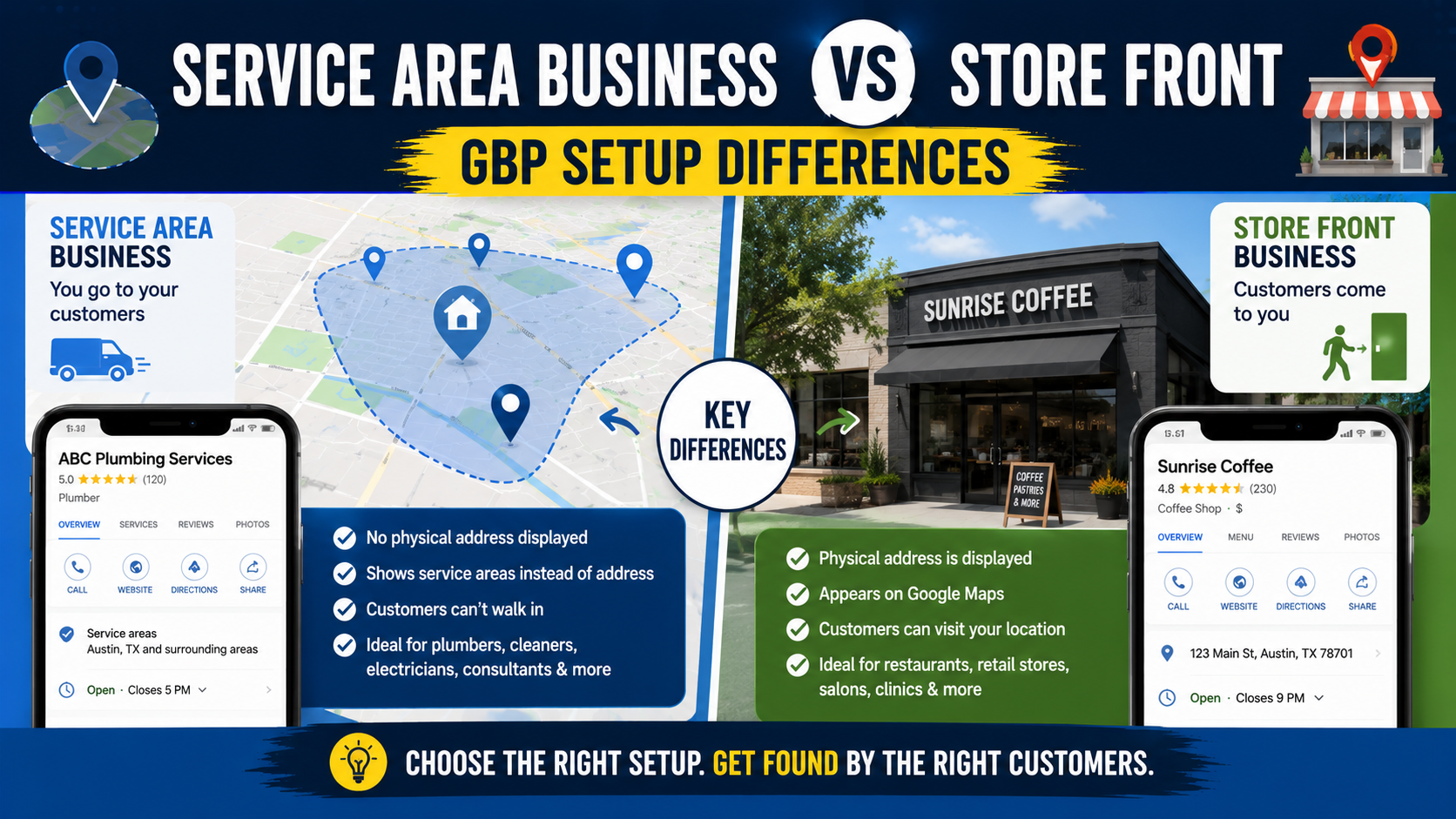
One of the easiest ways to create problems with a Google Business Profile is choosing the wrong business type.
I have seen home-service businesses proudly display a residential address because someone told them that showing an address would help them rank.
I have also seen legitimate storefront businesses hide their address because they thought every company serving multiple cities should be set up as a service-area business.
Both situations create unnecessary confusion.
The problem usually starts with a simple misunderstanding:
A service area is not the same thing as a storefront.
Google treats them differently.
A plumber who drives to customers is not set up the same way as a dental clinic customers visit.
A restaurant that serves diners and also delivers is different again.
Google currently separates these businesses into three practical categories:
- Storefront businesses
- Service-area businesses
- Hybrid businesses
Google says a Business Profile is generally intended for businesses that interact with customers in person, either at a fixed location customers can visit or by traveling to customers in a local area. (support.google.com)
Getting this classification right matters because it affects your address, service area, verification, signage requirements, and how customers see your business on Google Maps.
Here is the simplest way to work out which setup you need.
What Is a Storefront Business?
A storefront business serves customers at a physical location.
That does not necessarily mean you operate a traditional retail shop.
A storefront could be:
- Dental clinic
- Restaurant
- Law office
- Hair salon
- Auto repair shop
- Medical clinic
- Furniture showroom
- Retail store
- Gym
- Accounting office
The key question is:
Can customers genuinely come to your business location during the hours shown on your profile and receive service there?
If yes, a storefront setup may be appropriate.
Google’s guidelines say businesses displaying an address should operate from an actual real-world location and maintain permanent fixed signage showing the business name. (support.google.com)
That signage requirement is one of the details people often overlook.
A rented room with no sign, no staff, and no ability to receive customers is not automatically a storefront just because you can receive mail there.
What Is a Service-Area Business?
A service-area business, often shortened to SAB, goes to the customer instead of serving the customer at its business address.
Classic examples include:
- Plumbers
- Electricians
- Cleaning services
- Mobile locksmiths
- Landscapers
- Pest control companies
- Mobile pet services
- Some HVAC contractors
- Some roofing companies
Google defines a service-area business as one that visits or delivers directly to customers but does not serve them at its business address. (support.google.com)
Imagine you run a plumbing company from your house.
Customers never come to your home.
Your technicians leave from there in the morning and drive to customer properties.
That is a service-area business.
You may still need to provide Google with your real location during setup or verification.
But the important difference is that the address should not be publicly displayed to customers.
Google explicitly tells service-area businesses that do not serve customers at their address to remove or hide that address from the Business Profile. (support.google.com)
What Is a Hybrid Business?
This is where things get interesting.
A hybrid business does both.
Customers can visit the physical location, but the company also travels or delivers to customers.
Google gives the example of a business that serves customers at its own location while also delivering or visiting them. (support.google.com)
Some real-world examples could include:
- Auto repair shop that also provides roadside assistance
- Restaurant with dine-in and delivery
- Appliance store that also offers installation
- Flooring showroom with installation crews
- Landscaping company with a staffed showroom customers regularly visit
A hybrid business can usually display its physical address and set service areas.
But there is an important condition.
The location must genuinely qualify as a storefront.
Google says a hybrid business that shows an address should have permanent on-site signage, be staffed during stated hours, and be able to receive customers there. (support.google.com)
If those conditions are not met, the business should usually be treated as a service-area business instead.
The Fastest Way to Choose the Correct Setup
I use one simple test.
Ask:
Do customers come to your location?
If no, you are probably a service-area business.
If yes, continue.
Can they arrive during your stated business hours and actually receive service?
If no, you probably should not display the location as a storefront.
If yes, continue.
Is the location permanently staffed and clearly signed with the business name?
If yes, a storefront or hybrid setup may make sense.
Do you also travel to customers?
If yes, you may be hybrid.
If no, you are probably a normal storefront.
That basic decision tree solves most cases.
The Biggest Difference: Address Visibility
This is probably the most important setup difference.
Storefront
The physical address is normally visible.
Customers need it because they travel to the business.
Service-Area Business
The address should be hidden if customers are not served there.
Google says that if you do not serve customers at your business location, you should turn off the option to show the business address and use a service area instead. (support.google.com)
Hybrid
The address can be visible because customers legitimately visit the location.
You can also add service areas for the areas where you travel or deliver.
This sounds straightforward, but incorrect addresses are one of the most common GBP problems I encounter.
Don’t Show Your Home Address Just for SEO
This is especially relevant to contractors and home-service businesses.
Suppose a landscaper works from a home office.
Nobody visits the property.
There is no showroom.
There is no customer reception.
The owner might still think:
“If I show my address, maybe I’ll rank better around my house.”
That is the wrong reason to display it.
Google’s guidelines say service-area businesses should hide their addresses when customers are not served there. (support.google.com)
Besides the policy issue, displaying your private residential address can also create a poor customer experience.
Someone may drive to your house expecting an office.
Now they are standing outside your driveway looking confused.
Set the profile based on how the business genuinely operates.
Not what you think might create a ranking advantage.
Virtual Offices Are Not a Shortcut
Another common mistake is renting an address in a desirable city.
Imagine your roofing company is based outside Toronto.
You rent a mailbox or virtual office downtown and create another profile there.
The theory is:
“Now I can rank in Toronto.”
Google’s rules are clear about this.
A virtual office that the business does not actually operate from is not eligible as a Business Profile location. (support.google.com)
Co-working spaces have stricter requirements too.
Google says an office inside a co-working location must have clear signage, receive customers during business hours, and be staffed during those hours by the business’s own staff if it is going to qualify as a storefront location. (support.google.com)
Simply paying for an address does not create a legitimate location.
P.O. Boxes and Remote Mailboxes Don’t Count Either
Google does not allow P.O. boxes or remote mailboxes to act as Business Profile locations. (support.google.com)
That means:
P.O. Box 174
is not your physical storefront.
The same principle applies to many rented mailbox services.
If customers cannot genuinely visit your staffed business at that location, do not build your GBP setup around it.
Service Areas Work Differently From Addresses
When you operate a service-area business, Google lets you specify the places you serve.
These can include:
- Cities
- Postal codes
- Other defined geographic areas
Google currently allows up to 20 service areas on a service-area or hybrid Business Profile. (support.google.com)
For example, a contractor could list:
- Burlington
- Oakville
- Milton
- Hamilton
- Waterdown
if those are places the company genuinely serves.
What you cannot do is simply set a giant radius around your office.
Google says service areas can no longer be edited as a radius. Instead, businesses should specify cities, postal codes, or other supported geographic areas. (support.google.com)
Don’t Add Every City You Can Think Of
I sometimes see service-area profiles filled with 20 locations purely because 20 is the maximum.
That is the wrong mindset.
Your service areas should reflect where you actually work.
Google currently recommends keeping the overall boundaries of the service area within roughly two hours of driving time from where the business is based, although some businesses may reasonably operate over larger areas. (support.google.com)
If your cleaning business operates in Burlington, adding Montreal because you would theoretically accept a very large job there is not useful.
Be realistic.
Service areas are customer information.
They are not a keyword list.
Adding a Service Area Does Not Create Another GBP Location
This misconception causes a lot of disappointment.
Suppose your office is based in Oakville.
You add Burlington, Milton, and Hamilton as service areas.
That does not mean Google now considers you to have physical locations in four cities.
You still have one business location.
The service areas simply tell customers where you provide service.
This is also why creating a separate profile for every service area is usually wrong.
Google says a service-area business generally gets one profile for the overall area it serves. (support.google.com)
When Can a Service Business Have Multiple Profiles?
There is an important exception.
A service business can have multiple legitimate locations if it really operates separate locations with separate staff and service areas.
Google’s guidelines say businesses with different service locations, separate service areas, and separate staff at each location may qualify for one profile per location. (support.google.com)
For example:
A plumbing company has:
Location 1 – Burlington
Real office.
Dedicated staff.
Local operations.
Location 2 – Hamilton
Separate real office.
Separate staff.
Separate operations.
Those may qualify as separate Business Profiles.
That is very different from:
“One business at one address, but we want five profiles because we serve five cities.”
Storefront Signage Matters
If your profile shows a storefront address, make sure your real-world location supports that claim.
Google says businesses displaying their address should maintain permanent fixed signage showing the business name. (support.google.com)
This becomes especially important during verification.
A piece of paper temporarily taped to a door may not provide convincing evidence of a permanent business presence.
A genuine storefront might have:
- Exterior sign
- Window branding
- Permanent door sign
- Building directory listing where appropriate
Your real-world branding and GBP information should match.
If your Google profile says:
Green Oak Flooring
but the storefront says:
Oak Interiors Ltd.
you may need to explain the relationship or correct the profile.
Verification Can Look Different for Storefront and Service-Area Businesses
Google determines which verification methods are available for each profile.
You do not always get to choose your preferred method.
Video verification is one current option, and Google’s requirements clearly show how storefront and service-area businesses differ. (support.google.com)
Storefront Video Verification
Google may ask you to show:
- Street signs or nearby landmarks
- Building number
- Storefront
- Permanent business signage
- Proof that you manage the business
- Employee-only areas or business systems
For example, you might record yourself approaching the shop, show the exterior sign, enter the premises, and demonstrate access to a staff-only area.
Service-Area Video Verification
A plumber operating from home cannot show a public storefront because there isn’t one.
Instead, Google may ask for evidence such as:
- Street signs or nearby landmarks around the operating location
- Professional tools
- Equipment
- Work vehicle
- Business cards
- Branded clothing
- Business documents
- Proof that you control business assets
Google specifically says service-area businesses operating from home can show nearby street identifiers and evidence such as tools, equipment, business documents, or branded vehicles. (support.google.com)
The point is to prove that the business is real and that you are authorized to manage it.
Prepare for Video Verification Before You Start
One practical lesson here:
Do not open the verification process and then start figuring out what to show.
Google says verification videos must be recorded through the Business Profile from a mobile device, be unedited, and show the required evidence. (support.google.com)
Before recording, prepare.
For a storefront:
- Clean up the entrance
- Make sure signage is visible
- Know what nearby street markers you can show
- Have access to staff-only areas
For an SAB:
- Have your work vehicle nearby
- Have tools available
- Prepare appropriate business documentation
- Know which street or location markers you can show
- Make sure branding matches the profile
A little preparation saves a lot of frustration.
Business Hours Mean Different Things Depending on the Setup
Hours are another area where businesses guess.
For a storefront, the hours generally tell customers when they can visit.
For a service business, they should reflect the periods when the business is actually operating and able to serve customers appropriately.
For a hybrid business, Google specifically says storefront hours should represent times when staff are available at the location. (support.google.com)
Do not list:
Open 24 hours
just because your website has a contact form that works at midnight.
If you genuinely provide a 24-hour emergency service, that may be appropriate.
Otherwise, use real operating hours.
Google also lets eligible businesses set special hours for temporary changes and additional hours for particular services. (support.google.com)
What Information Stays the Same?
Despite the setup differences, most GBP optimization basics are similar.
Both storefront and service-area businesses should pay attention to:
- Correct business name
- Primary category
- Secondary categories
- Phone number
- Website
- Services
- Business description
- Hours
- Photos
- Reviews
- Review responses
- Posts and updates where useful
Google Business Profile is free for eligible storefront and service businesses, and both types can use it to manage information appearing in Search and Maps. (support.google.com)
The location setup changes.
The need for accurate business information does not.
Storefront Photos vs Service-Area Photos
The photo strategy can also be slightly different.
Storefront Business
I would prioritize:
- Exterior signage
- Entrance
- Interior
- Reception
- Product displays
- Team
- Parking
- Customer areas
These images help someone recognize and evaluate the location.
Service-Area Business
I would focus more on:
- Team members
- Vehicles
- Equipment
- Finished projects
- Before-and-after photos
- Work in progress
- Branded uniforms
- Tools
A plumber does not need to upload 15 photos of the garage where the company is registered.
Customers care about the actual work.
Hybrid Businesses Need Both Types of Proof
A flooring company with a real showroom and installation team should probably show both sides of the business.
For example:
Showroom photos
so customers know they can visit.
Installation photos
so customers can see the work completed in homes.
That makes the profile accurately reflect how the company operates.
A Simple Storefront GBP Setup
If I were setting up a dental clinic, my basic process would be:
Step 1: Confirm Eligibility
Customers visit the clinic in person.
Good.
Step 2: Use the Real Business Name
No extra keywords.
Step 3: Enter the Real Address
Make sure Maps places the pin correctly.
Step 4: Confirm Permanent Signage
The real-world name should match the profile.
Step 5: Add Accurate Hours
Use the times patients can actually visit.
Step 6: Choose the Correct Categories
For example, Dentist as the primary category where appropriate.
Step 7: Add Services
Fill in the actual treatments or services offered.
Step 8: Add Photos
Exterior, entrance, reception, treatment environment, and team.
Step 9: Complete Verification
Follow whichever method Google offers.
That is a normal storefront setup.
A Simple Service-Area GBP Setup
Now imagine a landscaping contractor operating from home.
Step 1: Confirm Eligibility
The company visits customers and performs landscaping at their properties.
Good.
Step 2: Use the Real Business Location for Setup
Provide accurate information to Google where required.
Step 3: Hide the Address From Customers
Because customers are not served there.
Step 4: Add Real Service Areas
For example:
- Burlington
- Oakville
- Milton
- Hamilton
Step 5: Add Accurate Categories
Such as Landscaper and other legitimate categories.
Step 6: Add Services
Patio installation, grading, sod, drainage, and other real offerings.
Step 7: Upload Work Photos
Real projects, equipment, team, and vehicles.
Step 8: Prepare for Verification
Have tools, vehicles, local identifiers, and proof of business control available.
That is a proper service-area setup.
A Simple Hybrid GBP Setup
Imagine a flooring company with a real showroom.
Customers visit the showroom to see materials.
Installation crews also travel to customer homes.
This is a classic hybrid model.
The setup would include:
- Visible showroom address
- Permanent signage
- Store hours
- Relevant service areas
- Product/showroom photos
- Installation/project photos
The physical location has to be real and staffed.
If the “showroom” is actually an appointment-only storage unit with no permanent sign and customers are not normally served there, I would rethink the setup.
Common GBP Setup Mistakes
Showing a Residential Address for an SAB
If customers do not visit there, hide it.
Creating Fake City Locations
Serving a city does not mean you have a location there.
Using a Virtual Office
A virtual mailing address is not a legitimate storefront.
Creating Multiple Profiles for One SAB
One central service-area business generally gets one profile unless separate legitimate staffed locations exist.
Adding 20 Random Service Areas
Only add places you genuinely serve.
No Signage at a Storefront
Google expects businesses showing addresses to maintain permanent signage.
Calling a Location a Storefront When Customers Cannot Visit
If customers cannot receive service there during stated hours, the location may not qualify.
Using Fake 24-Hour Hours
Your contact form being available 24/7 is not the same as the business operating 24 hours.
Ignoring Verification Differences
An SAB will not necessarily be able to provide the same storefront evidence as a retail location.
Prepare the correct proof.
Does Being a Storefront Help You Rank Better Than Being an SAB?
This is where people are often tempted to bend the rules.
They assume:
“If displaying an address gives Google a stronger location signal, I should show mine.”
That is the wrong way to think about it.
Google’s local ranking system considers factors such as relevance, distance, and prominence, but your profile still needs to follow Google’s business representation rules.
Changing an SAB into a fake storefront does not move your legitimate physical operations.
It simply creates an inaccurate profile.
For a service business, focus instead on:
- Correct categories
- Complete services
- Genuine reviews
- Strong website pages
- Real service-area content
- Good photos
- Local links
- Accurate business information
A properly configured SAB is better than a fake storefront constantly at risk of edits, verification issues, or suspension.
Final Thoughts
The difference between a service-area business and a storefront is actually simple once you ignore all the SEO tricks surrounding it.
Ask one question:
Where does the real customer interaction happen?
If customers come to your permanently staffed, properly signed business location, you may have a storefront.
If you travel to customers and they do not visit your business address, you are usually a service-area business.
If both happen, you may be hybrid.
Google’s current rules reflect exactly that distinction. Service-area businesses should hide addresses where customers are not served, storefronts displaying an address should operate from real customer-facing locations with permanent signage, and hybrid businesses can display both a legitimate physical location and service areas. (support.google.com)
Service-area and hybrid profiles can currently add up to 20 service areas, typically using cities, postal codes, or other defined regions rather than an editable radius. Google also recommends keeping the overall service territory reasonably close to the business base in most cases. (support.google.com)
The biggest mistake is trying to choose the business type based on which one you think will rank better.
Choose the one that reflects reality.
A plumber working from home does not need to pretend to have a storefront.
A real showroom should not hide its location for no reason.
And a business that serves customers both ways should not ignore the hybrid option.
Set the profile up the way the business actually operates.
That makes verification easier.
It gives customers more accurate information.
And it gives you a much stronger foundation for everything else you plan to do with local SEO.