The first CRM I ever helped set up was supposed to save us time.
Instead, for the first few weeks, it created more work.
We spent hours importing contacts, creating categories, adding sales stages, and discussing how every little detail should be organized. Everyone was excited at the beginning, but after a month, I noticed something frustrating: people were going back to old habits.
Some team members were still keeping notes in Excel. Others were searching through email threads. A few were relying on memory.
The problem was not the CRM software.
The problem was choosing a system that did not match the way the business actually worked.
That experience changed how I look at CRM tools for small businesses. The “best” CRM is not always the one with the biggest feature list or the most famous brand name. It is the one your team will realistically use every day.
Over the years, I have tested and worked with different CRM platforms, and each one has its own strengths and weaknesses. Some are perfect for beginners, some are better for sales teams, and some are powerful but too complicated for a small business.
In this guide, I will compare the best CRM options for small businesses based on practical use, not just marketing claims.
What Makes a Good CRM for a Small Business?
Before comparing tools, it is important to understand what small businesses actually need.
Many CRM companies advertise hundreds of features, but most small teams mainly need a few things:
Contact Management
You should be able to quickly find:
- Customer details
- Previous conversations
- Purchase history
- Notes
- Important dates
If finding customer information takes longer than having the conversation itself, the CRM is not helping.
Lead Tracking
A good CRM should answer simple questions:
- How many new leads came in this month?
- Which leads need follow-up?
- Which deals are close to completion?
- Who is responsible for each customer?
Easy Team Collaboration
Small businesses usually have limited people handling multiple responsibilities.
The CRM should make teamwork easier, not create extra administrative work.
Reasonable Pricing
A small business does not need enterprise-level software with expensive features it will never use.
The goal is improving organization without creating unnecessary costs.
1. HubSpot CRM: Best Overall CRM for Small Businesses
HubSpot is probably one of the first names people hear when searching for a CRM.
The reason is simple: it is easy to start with.
I have recommended HubSpot to small teams that were moving away from spreadsheets because the learning curve is much smoother compared to many traditional CRM systems.
The free version already includes useful features:
- Contact management
- Deal pipelines
- Email tracking
- Task reminders
- Basic reporting
For a small business owner who has never used a CRM before, this simplicity is valuable.
Where HubSpot Works Well
Imagine a small marketing agency receiving leads from:
- Website forms
- Facebook messages
- Referrals
Instead of keeping everything scattered, the team can add each lead into HubSpot and track the journey.
A salesperson can see:
“Lead contacted on Monday. Proposal sent Wednesday. Follow-up scheduled Friday.”
That small amount of information prevents many missed opportunities.
Where HubSpot Can Become Expensive
The free plan is attractive, but businesses sometimes outgrow it.
Advanced features like:
- Marketing automation
- Advanced reporting
- More customization
can require paid plans.
My lesson with HubSpot was this: do not upgrade because a feature looks interesting. Upgrade only when your business actually needs it.
Best For:
✓ Small businesses starting with CRM
✓ Marketing agencies
✓ Service businesses
✓ Teams that need an easy setup
2. Zoho CRM: Best Budget-Friendly Option
Zoho is a popular choice among small businesses that want more customization without paying premium prices.
The first thing I noticed about Zoho is that it gives you a lot of control.
You can customize:
- Sales pipelines
- Customer fields
- Workflows
- Reports
This makes it useful for businesses with specific processes.
For example, a real estate company may need different information compared to a software company.
A real estate agent might track:
- Property preferences
- Budget range
- Location interest
- Viewing dates
Zoho allows businesses to build around their workflow.
The Learning Curve
The downside is that Zoho can feel less beginner-friendly than HubSpot.
There are many options, and new users can sometimes feel overwhelmed.
I have seen businesses spend too much time customizing instead of actually using the CRM.
The best approach is to start simple.
Do not create a complicated system on day one.
Best For:
✓ Small businesses wanting customization
✓ Companies managing complex customer data
✓ Businesses looking for affordable paid plans
3. Pipedrive: Best CRM for Sales-Focused Teams
Pipedrive takes a different approach.
Instead of focusing heavily on marketing features, it focuses on sales pipelines.
The interface is built around moving deals through stages.
For example:
New Lead → Contacted → Meeting Scheduled → Proposal Sent → Won
This visual approach makes it very easy for sales teams.
I found Pipedrive especially useful for businesses where the main challenge is managing sales opportunities.
A small consulting company, for example, can immediately see:
- Which clients are interested
- Which deals are waiting
- Which opportunities need attention
The Limitation
Pipedrive is excellent for sales management, but businesses looking for advanced marketing tools may find it limited compared to platforms like HubSpot.
Best For:
✓ Sales teams
✓ Consultants
✓ Agencies
✓ Businesses with a clear sales process
4. Salesforce: Powerful but Often Too Much for Small Businesses
Salesforce is one of the biggest CRM platforms in the world.
There is a reason large companies use it.
It can handle:
- Complex sales operations
- Large teams
- Advanced automation
- Detailed reporting
But here is where many small businesses make a mistake.
They choose Salesforce because they think:
“Big companies use it, so it must be the best.”
Not always.
A CRM should fit your current business stage.
For a five-person company, Salesforce may feel like buying a commercial kitchen when you only need to cook dinner for your family.
The setup often requires more technical knowledge and customization.
Best For:
✓ Growing companies
✓ Larger sales teams
✓ Businesses with complex requirements
5. Freshsales: Simple CRM With Strong Communication Features
Freshworks offers Freshsales, which focuses on making customer communication easier.
It includes features like:
- Email tracking
- Contact management
- Sales pipelines
- AI-based assistance features
I like Freshsales for businesses that want something between a basic CRM and a more advanced sales system.
It feels cleaner than some traditional CRM platforms.
Best For:
✓ Small sales teams
✓ Businesses already using Freshworks products
✓ Companies wanting simple communication tracking
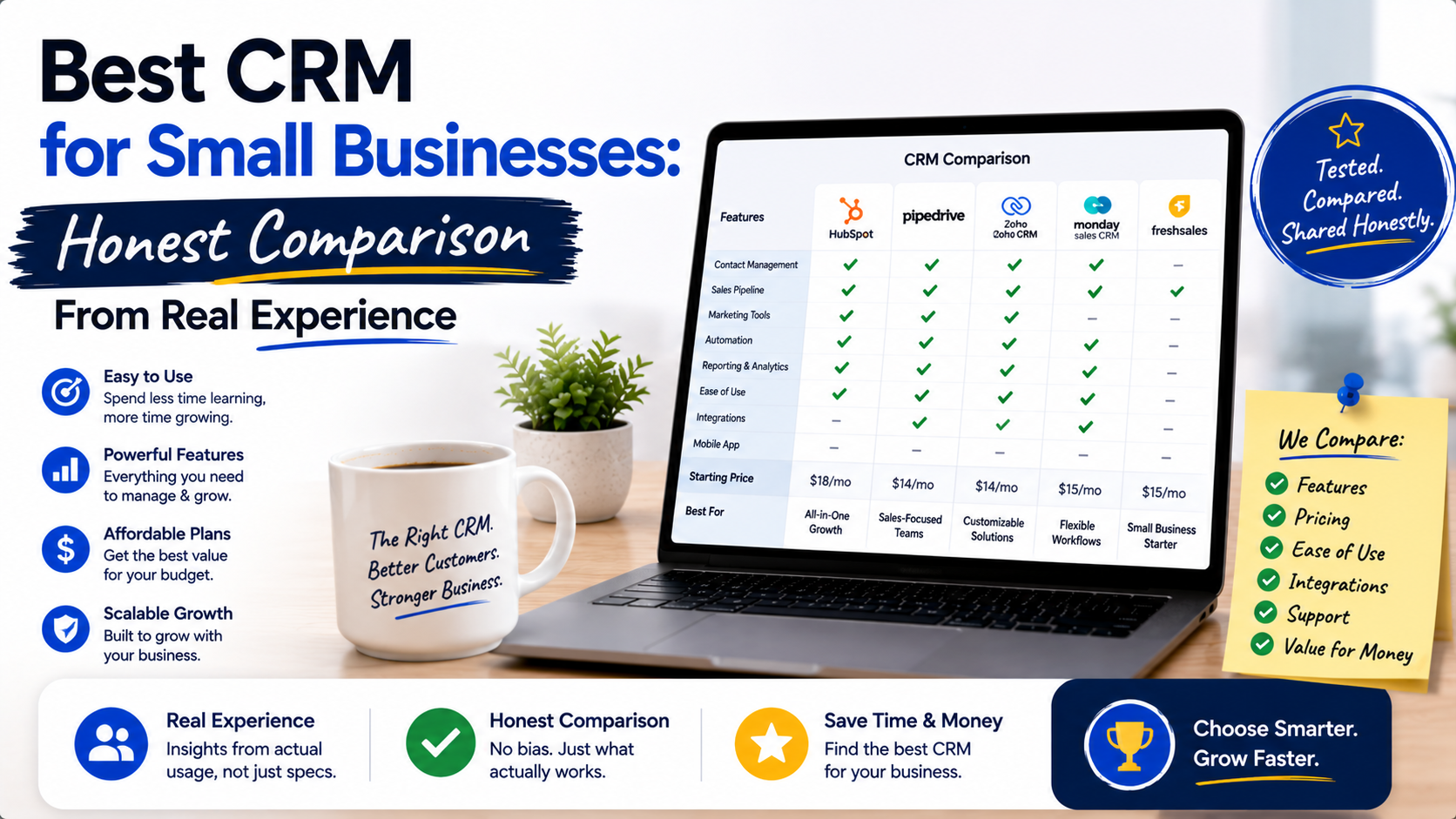
Honest CRM Comparison Table
| CRM | Best For | Main Advantage | Possible Problem |
| HubSpot | Beginners | Easy setup and free plan | Paid features can become expensive |
| Zoho CRM | Custom workflows | Flexible and affordable | Takes time to learn |
| Pipedrive | Sales teams | Excellent pipeline view | Less marketing-focused |
| Salesforce | Growing companies | Extremely powerful | Too complex for many small businesses |
| Freshsales | Communication-focused teams | Simple interface | Fewer advanced features |
How to Choose the Right CRM for Your Business
Choosing a CRM becomes easier when you follow a process.
Step 1: Identify Your Main Problem
Do not start by comparing features.
Start with the problem.
Ask:
“Why do we need a CRM?”
Possible answers:
- We forget follow-ups
- Customer data is scattered
- Sales tracking is difficult
- Team communication is messy
Your answer determines what type of CRM you need.
Step 2: Map Your Customer Journey
Write down your actual process.
For example:
Customer contacts us → We reply → We send pricing → Customer decides → Deal closes
Your CRM should support this process.
Not force you into a completely different one.
Step 3: Test Before Committing
Most CRM platforms offer trials.
Use them with real situations.
Add actual leads.
Create real deals.
Ask your team:
“Does this make your work easier?”
Their feedback matters more than a feature comparison page.
Common CRM Mistakes Small Businesses Make
Choosing Based Only on Price
The cheapest CRM is not always the best choice.
A free tool that nobody uses is more expensive than a paid tool that improves your workflow.
Adding Too Many Features
I have seen businesses create complicated systems with dozens of fields.
After a few months, nobody updates them.
Keep only information that helps your team.
Not Creating a CRM Routine
A CRM only works when it becomes part of daily work.
Simple habits help:
- Add new leads immediately
- Update deal stages regularly
- Schedule follow-ups
- Review customer information weekly
Expecting the CRM to Fix Sales Problems
A CRM organizes your process.
It does not replace good communication, marketing, or customer service.
So, What Is the Best CRM for Small Businesses?
There is no single winner for every business.
If you want something simple and reliable, HubSpot CRM is a great starting point.
If you need customization at a reasonable cost, Zoho CRM is worth considering.
If your business is mainly sales-driven, Pipedrive is one of the easiest systems to manage.
If you are growing quickly with complex needs, Salesforce may make sense later.
The biggest lesson I have learned from using CRMs is that success does not come from buying the most powerful software.
It comes from creating a simple system your team actually follows.
A CRM should remove confusion, not create another task list.
Start with your business problems, choose a tool that matches your workflow, and build the habit of keeping customer information organized.
That is when a CRM becomes less like software and more like a reliable business partner.