I’ve seen this happen more times than I can count when looking at a local business’s SEO.
The owner opens Google, searches something like “roofer near me,” sees three competitors sitting prominently above most of the normal search results, and immediately asks:
“Why are they there and we’re not?”
Then we open the business’s Google Business Profile.
Wrong primary category.
Ten-month-old photos.
Barely any services listed.
Business hours that haven’t been updated.
A website that says almost nothing about the city the company actually serves.
Twenty reviews compared with competitors sitting at 150, 200, or more.
Suddenly the mystery is not much of a mystery.
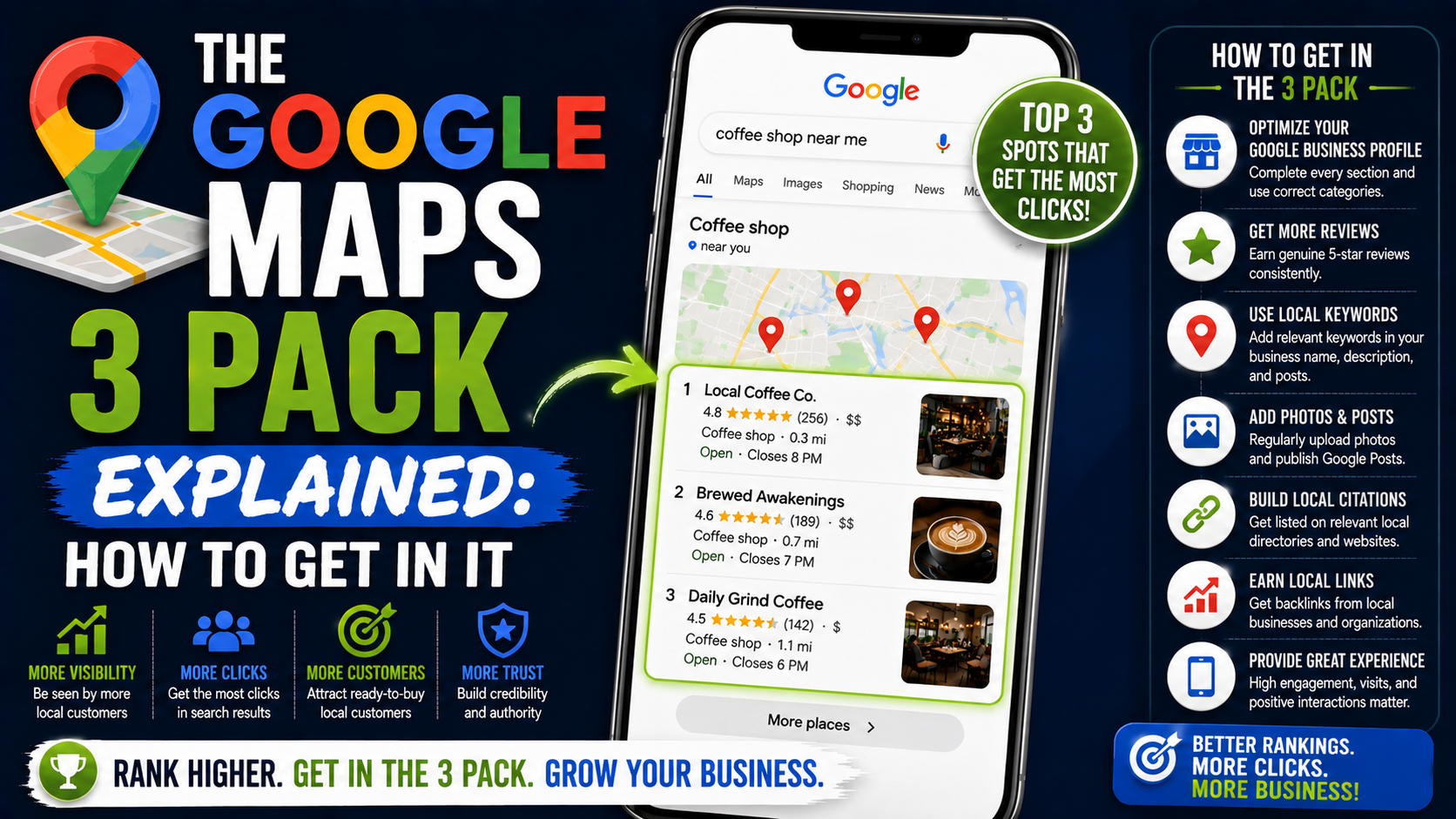
Those three businesses are appearing in what local SEOs commonly call the Google Maps 3 Pack, Local Pack, or simply Map Pack.
And for a local business, getting visibility there can be extremely valuable.
A plumber does not necessarily need someone to read six blog posts before calling. A customer with water leaking through the ceiling may search “emergency plumber near me,” look at a few nearby businesses, check reviews, and make a phone call.
The same thing happens with dentists, landscapers, attorneys, HVAC companies, electricians, restaurants, roofers, auto repair shops, salons, and dozens of other local businesses.
So how do you actually get into the Google 3 Pack?
There is no magic button, and anyone promising guaranteed placement should make you cautious.
But there are practical things you can improve.
Let’s start with what the 3 Pack actually is.
What Is the Google Maps 3 Pack?
Search Google for something with obvious local intent.
Try:
“dentist near me”
“roof repair Dallas”
“landscaper in Toronto”
“pizza restaurant nearby”
“personal injury lawyer Chicago”
Depending on the search, location, device, and current Google interface, you may see a map accompanied by a small group of prominent local business results.
The commonly used SEO term for this area is the Google Maps 3 Pack.
Traditionally, three businesses are prominently displayed before someone expands the local results, which is where the “3 Pack” name comes from.
A typical listing can show information such as:
Business name
Star rating
Number of reviews
Business category
Address or service information
Opening hours
Photos
Phone or contact options
Directions
Website links
Other profile features depending on the business category
The exact layout can change, and Google frequently adjusts how Search and Maps results are presented.
The important point is not whether Google displays exactly the same interface every time.
The important point is that these local results occupy valuable search-result real estate and can put a business in front of someone already looking for that type of service.
Why the Google 3 Pack Matters So Much
Think about how people actually search.
Imagine your air conditioner stops working in the middle of summer.
You probably do not search:
“history of residential HVAC technology.”
You search:
“AC repair near me.”
You want someone nearby.
You want them available.
You want decent reviews.
And you want to know whether they handle the problem you have.
Google’s local results are designed around this kind of intent.
That is why Maps visibility can be commercially important.
A business appearing prominently for searches such as:
“emergency electrician near me”
“best divorce lawyer near me”
“concrete contractor Austin”
“garage door repair Phoenix”
is showing up when someone may already be close to making a buying decision.
This is very different from ranking a blog article for an informational search.
Traffic is nice.
Intent is better.
Google Tells Us the Three Main Things That Matter
This is one area where Google gives businesses fairly useful guidance.
According to Google, local search results are mainly based on three factors:
Relevance
Distance
Prominence
Google uses these factors together to determine which businesses appear for local searches.
Understanding these three ideas makes local SEO much easier.
Instead of asking:
“How do I trick Google Maps?”
ask:
“How do I make my business a strong, trustworthy, relevant result for this search?”
That produces much better decisions.
1. Relevance: Does Your Business Actually Match the Search?
Suppose someone searches:
“deck builder near me.”
Google needs to decide which nearby businesses are actually relevant to deck construction.
Imagine two companies.
Company A has:
Primary category: Deck Builder
Deck construction listed as a service
A website page about deck construction
Photos of completed decks
Reviews mentioning deck projects
Clear information about its service area
Company B has:
Primary category: General Contractor
No deck service listed
A homepage that vaguely says “complete home solutions”
No deck projects
No specific deck page
Which business gives Google clearer information?
Usually Company A.
Google describes relevance as how closely a Business Profile matches what someone is searching for and recommends providing complete, detailed business information so it can better understand the company.
This is why local SEO starts with clarity.
Google should not have to guess what your company does.
Your Primary Category Matters More Than Most Business Owners Realize
One of the first things I check on an underperforming Google Business Profile is its category.
I have seen businesses spend months adding posts and uploading photos while their primary category does not properly represent the service they actually want to rank for.
Categories help Google understand the type of business you operate.
Google specifically says the categories selected can affect local ranking and recommends selecting the most specific category that accurately describes the main business.
For example, a company primarily focused on roofing should not automatically use a broad category simply because it offers several construction-related services.
Likewise, a specialized attorney may have a more accurate category available than simply “Law Firm.”
Do not choose categories based only on which keyword you want.
They need to accurately represent the actual business.
That distinction matters.
Add the Services You Really Offer
Categories tell Google what kind of business you are.
Services help explain what you do.
Suppose a landscaping company provides:
Landscape design
Sod installation
Yard grading
Drainage installation
Retaining walls
Paver patios
Landscape lighting
Those should not be hidden somewhere deep inside the website.
Add legitimate services to the Google Business Profile where applicable.
Google may also use service information when presenting customers with details relevant to a business. For some service businesses, Google says available job types can come from the merchant’s service list, website, business type, and other authoritative sources.
The goal is not to stuff keywords everywhere.
The goal is to make the business understandable.
2. Distance: The Factor You Cannot Completely Control
Distance causes a lot of confusion.
A business owner searches their main keyword from the office and sees themselves at number two.
Then their friend searches from six miles away and cannot find the company.
Nothing is necessarily broken.
Local rankings can change depending on the searcher’s location.
Google says distance considers how far a potential search result is from the location used in the search. If a user does not explicitly specify a location, Google estimates location using the information available to it.
That means there is no single universal Maps ranking for:
“plumber near me.”
You might rank well two miles from your location and much worse eight miles away.
This is why checking a Google Maps ranking from one laptop at one location can give you a misleading picture.
Use a Local Rank Grid Instead of Checking One Spot
When working on local SEO, I prefer looking at geographic ranking patterns rather than one search position.
Tools such as:
Local Falcon
BrightLocal
Places Scout
can help visualize rankings across multiple points on a map.
You might discover something like:
1 mile away: Position 2
2 miles north: Position 3
3 miles east: Position 5
5 miles south: Position 11
8 miles away: Position 18
That tells you far more than saying:
“We rank number three.”
You do not simply rank number three.
You rank differently depending on where the person is searching.
This is especially important for businesses serving large cities.
Do Not Try to Fake Your Location
Because proximity matters, some businesses are tempted to create fake offices.
That can include:
Virtual offices
Mailboxes
Fake suites
Employee houses being represented as staffed locations
Addresses where the company does not legitimately operate
That is risky.
If you operate as a service-area business, configure your Business Profile according to Google’s eligibility and representation requirements rather than inventing locations just to expand a Maps footprint.
A short-term ranking trick is not worth losing a profile that generates real leads.
3. Prominence: Is Your Business Established and Trusted?
Prominence is where local SEO becomes bigger than the Google Business Profile itself.
Google describes prominence as how well known a business is.
It says local prominence can be influenced by information Google has about a business from across the web, including links and reviews. Google also notes that having more reviews and positive ratings can help local ranking.
That gives us several practical areas to work on.
Reviews.
Links.
Mentions.
Website authority.
Business information across the web.
General reputation.
This is why filling out a GBP perfectly does not automatically make a brand-new company outrank an established local competitor with years of legitimate authority.
Reviews Matter, but Do Not Turn Them Into a Numbers Game
I would never tell a client:
“You need exactly 100 reviews to rank.”
Local SEO is not that predictable.
But reviews clearly matter.
Google itself says reviews can help a business stand out and that more reviews and positive ratings can help local ranking.
Look at the competitive environment.
If you are a dentist with:
18 reviews
and the companies consistently appearing around you have:
240 reviews
315 reviews
190 reviews
then reputation building probably deserves attention.
But do it properly.
Ask real customers for real reviews.
Google allows businesses to share a review link or QR code to encourage customers to provide feedback. What you should not do is offer incentives such as free or discounted products or services in exchange for posting, changing, or removing reviews. Google considers those practices prohibited fake or misleading engagement.
A simple review request often works better anyway.
Something like:
“Thanks for choosing us. If you were happy with the work, would you mind sharing your experience on Google? Here’s the link.”
Simple.
No awkward five-star pressure.
Review Velocity Should Look Natural
Another mistake is ignoring reviews for two years and then suddenly trying to collect 80 in a week.
I would rather see a healthy flow of genuine customer feedback over time.
Build review requests into your normal process.
For a home-service company, that might mean sending the request after the project is finished.
For a dentist, after the appointment.
For an ecommerce pickup location, after collection.
For a restaurant, through an appropriate post-visit process.
Tools such as Podium, Birdeye, NiceJob, Jobber, and other CRM or reputation-management platforms can help automate parts of this process.
You do not necessarily need another paid tool, though.
A direct Google review link combined with a simple SMS or email workflow can be enough for many small businesses.
Respond to Reviews Instead of Treating Them Like Decorations
Reviews are conversations.
Reply to them.
Google explicitly recommends responding to customer reviews and says helpful responses can help a business stand out.
You do not need a 200-word response.
If someone writes:
“Great experience. Mike installed our new patio and everything was finished on schedule.”
A natural reply could be:
“Thanks, Sarah. Glad you’re happy with the new patio. We really appreciate you trusting our team with the project.”
That is much better than pasting:
“Thank you for your valuable feedback. Customer satisfaction is our top priority.”
under 300 reviews.
People can tell when nobody is actually reading them.
Complete Your Google Business Profile Properly
This sounds basic.
It is also commonly neglected.
Google says complete and accurate Business Profile information makes businesses more likely to appear for relevant local searches. It specifically recommends keeping details such as address, phone information, hours, category, and other applicable business information accurate and current.
Go through your profile carefully.
Check:
Business name
Primary category
Additional categories
Address or service area setup
Phone number
Website
Regular hours
Holiday/special hours
Services
Business attributes
Photos
Videos
Other category-specific fields
A partially completed GBP is rarely where I want to start competing against businesses that have maintained theirs properly for years.
Verify the Business
If the profile is not verified, deal with that first.
Google recommends verification because it confirms that you are authorized to represent the business and makes the profile eligible to be properly managed and surfaced.
Do not build an elaborate optimization strategy around an unresolved verification problem.
Fix the foundation first.
Upload Real Photos
Photos will not magically turn position 15 into position one.
But they matter for the quality of the profile.
Google recommends adding photos and videos to help customers understand what a business offers.
For a contractor, I would rather see:
Actual crews
Before-and-after work
Completed projects
Equipment
Office or storefront photos
Real team photos
Project details
than 50 generic stock images of smiling construction workers.
For a restaurant:
Real dishes.
Real tables.
Real dining area.
Real exterior.
For a dentist:
Real office.
Reception.
Treatment rooms where appropriate.
Team.
Parking or entrance if it helps visitors.
The profile should make somebody comfortable enough to take the next step.
Your Website Still Matters for Google Maps SEO
One mistake I see is treating Google Business Profile optimization and website SEO as completely separate projects.
They support each other.
Google itself notes that prominence can include links to the business from around the web.
Your website also gives search engines far more information about your services than a small profile ever can.
Suppose you are an HVAC company.
A useful website structure might include:
Home
AC Repair
AC Installation
Furnace Repair
Furnace Installation
Heat Pump Services
Emergency HVAC Repair
Commercial HVAC
Service Areas
Contact
Each important service deserves enough useful information for a customer to understand:
What you do.
Who it is for.
What problems you solve.
Where you provide it.
What the process looks like.
What makes your company credible.
Do not create 100 nearly identical pages by swapping city names.
That is not useful local SEO.
Build pages because they help actual customers.
Build Useful Location Pages When You Genuinely Serve Multiple Areas
If you serve several cities, location pages can make sense.
But there is a big difference between:
A useful local landing page.
and:
A city-name template generated 80 times.
A strong service-area page can include:
Services offered in that city
Relevant project examples
Neighborhoods or areas served
Real customer testimonials
Local FAQs
Photos of work completed there
Information about travel/service logistics
Links to important services
Contact information
The page should have a reason to exist beyond ranking for “[service] + [city].”
Keep Business Information Consistent Across the Web
You may hear local SEOs talk about NAP.
That simply means:
Name, Address, Phone number.
Your core business information should not tell conflicting stories.
Suppose Google sees:
Website: ABC Landscaping LLC
Facebook: ABC Landscape Company
Directory listing: ABC Landscaping & Construction
Google Business Profile: ABC Landscaping
Old directory: different phone number
Another directory: previous address
Small variations are not automatically catastrophic.
But obvious conflicting information does not help.
Clean up important listings.
Start with major platforms and high-value industry directories rather than chasing hundreds of low-quality directory submissions.
Accuracy beats volume.
Earn Local Links Instead of Buying Garbage Backlinks
Links still matter beyond normal organic SEO.
Google specifically mentions links as part of the information that can contribute to prominence in local search.
But that does not mean:
“Buy 5,000 backlinks for $25.”
Look for legitimate local opportunities.
Examples include:
Local business associations
Chambers of commerce
Industry organizations
Suppliers
Business partners
Local sponsorships
Relevant local publications
Community organizations
Professional directories
Local project features
A roofing contractor getting mentioned by a legitimate local home-building organization makes far more sense than receiving 300 links from random websites in unrelated countries.
Analyze the Competitors Already in the 3 Pack
One of the fastest ways to understand a market is to study what is already working.
Search your main keywords.
For each competitor appearing frequently, check:
Primary category
Additional categories where discoverable
Review count
Review rating
Review recency
Services
Photos
Website structure
Service pages
Location pages
Backlink profile
Business age where known
Local mentions
On-page content
You are not trying to copy them.
You are trying to identify the gap.
For example, perhaps your GBP is already stronger.
But their website has 40 legitimate local links and yours has four.
Or perhaps your website is much better, but you have 22 reviews and they have 350.
Maybe your review count is competitive, but your category is wrong.
Maybe everything looks good except you are simply farther from the search area.
Different problems require different fixes.
Do Not Obsess Over Google Business Profile Posts
GBP posts can be useful.
They can show:
Offers
Updates
Events
New services
Recent projects
Important announcements
But I would not spend five hours a week writing posts while ignoring the basics.
I have seen businesses worry about posting three times every week while:
Their category is wrong.
Their review process is nonexistent.
Their website has major problems.
Their service pages are weak.
Their contact details are inconsistent.
Prioritize based on impact.
A beautifully designed Google post does not compensate for a fundamentally weak local search presence.
How I Would Work on a Business That Is Not in the 3 Pack
If I opened a local company’s profile tomorrow and needed to improve its local visibility, this is roughly the order I would follow.
Step 1: Confirm Eligibility and Verification
Make sure the Google Business Profile legitimately represents the business and is properly verified.
Step 2: Audit the Business Information
Check name, address/service-area configuration, phone, website, hours, and other core details.
Fix obvious mistakes first.
Step 3: Audit the Primary Category
Ask:
Does this category accurately describe the main business?
Is there a more specific option?
What categories are strong local competitors using?
What services generate the most revenue?
Choose based on accuracy and business importance, not keyword stuffing.
Step 4: Review Additional Categories
Add only legitimate secondary business categories.
Do not fill every available category slot just because you can.
Step 5: Complete the Service List
Add the services customers genuinely hire the business for.
Step 6: Compare Reviews
Look at the businesses currently winning the Map Pack.
Compare:
Review quantity
Average rating
Recent review activity
Review quality
Owner responses
Then build a legitimate system for requesting feedback from customers.
Step 7: Improve Photos and Profile Quality
Upload useful real-world photos and videos.
Replace outdated or irrelevant material.
Step 8: Audit the Website
Check whether the website clearly supports the services and locations the business wants to rank for.
Build genuinely useful service and location pages where necessary.
Step 9: Audit Local Authority
Look at:
Links
Business citations
Industry listings
Local partnerships
Press mentions
Relevant organizations
Find realistic authority-building opportunities.
Step 10: Track Rankings Geographically
Use a local grid tracker or manual checks from appropriate locations to understand where visibility is strong and weak.
Do not rely on one “near me” search from the office.
Step 11: Track Leads, Not Just Rankings
This part gets forgotten.
A ranking report is not revenue.
Track:
Phone calls
Form submissions
Booked appointments
Direction requests where useful
Qualified leads
Sales
Revenue
A business moving from position eight to position three is exciting.
But the actual question is:
Did it generate more business?
A Realistic Example
Imagine a landscaping company operating in a competitive city.
Its current situation:
Primary category: Landscape Designer
Main revenue source: Landscape construction
Reviews: 31
Top competitors: 130–300 reviews
Website: One five-page website
Services: Barely configured
Photos: Mostly old
Backlinks: Very few local links
Important service pages: Missing
Local grid: Strong near office, weak everywhere else
There is no single magic fix here.
I would not say:
“Just add keywords to your GBP.”
The work is broader.
First, determine whether the category accurately represents the core business.
Then complete services.
Improve the website around the actual high-value services.
Start consistently requesting legitimate reviews.
Upload real project photos.
Develop local authority.
Track the geographic ranking pattern.
Do that for several months and measure what changes.
Local SEO is usually closer to improving ten weak signals than discovering one secret trick.
Common Mistake: Stuffing Keywords Into the Business Name
Someone notices competitors called things like:
“Mike’s Plumbing – Emergency Plumber Dallas”
and thinks:
“I should add keywords too.”
Be careful.
Your Google Business Profile name should reflect the business’s real-world name according to Google’s guidelines.
Do not turn the name field into a keyword list just because competitors appear to be getting away with it.
Spam sometimes ranks.
That does not make it a safe long-term strategy.
Common Mistake: Creating Fake Locations to Cover More Cities
A service-area business wants to rank across an entire metropolitan region.
So somebody suggests:
“Just rent virtual offices in every city.”
This is exactly the type of shortcut that can create verification and profile-policy headaches.
You cannot completely remove proximity from local search.
Build legitimate relevance and prominence in the areas you serve instead of pretending you physically operate where you do not.
Common Mistake: Thinking More Reviews Automatically Means Position One
Reviews matter.
But Maps is not simply sorted from highest review count to lowest.
You will frequently find businesses with fewer reviews ranking above companies with more.
Why?
Because Google evaluates multiple factors together.
Remember:
Relevance.
Distance.
Prominence.
A business can have 700 reviews and still be a poor match for a particular query or too far from the searcher to dominate every search.
Common Mistake: Only Optimizing the Google Business Profile
Another common setup looks like this:
Great GBP.
Terrible website.
No backlinks.
No service pages.
No authority.
Weak local presence.
The Business Profile is not an isolated island.
Work on the entire local search footprint.
Common Mistake: Expecting Results Everywhere in the City
This causes unnecessary panic.
A business ranks number two near its physical location but position 14 on the opposite side of the city.
The owner assumes the SEO campaign has failed.
Not necessarily.
Distance exists.
The more useful question is whether the business’s geographic visibility is expanding in realistic areas and whether qualified calls and leads are increasing.
Local rankings need geographic context.
Can You Guarantee a Spot in the Google 3 Pack?
No.
Google explicitly says there is no way to request or pay Google for better local ranking, and the detailed ranking algorithm is not publicly disclosed.
Be cautious with anybody offering:
“Guaranteed #1 Maps ranking in seven days.”
“Permanent 3 Pack placement.”
“Pay us and Google will put you first.”
A legitimate local SEO campaign improves the factors you can influence.
You cannot promise exactly how Google’s algorithm will order every result for every person at every location.
How Long Does It Take to Get Into the Map Pack?
There is no universal timeline.
A low-competition business in a small town can behave very differently from:
A personal injury lawyer in Los Angeles.
An HVAC company in Dallas.
A dentist in Manhattan.
A roofer in Miami.
Competition matters.
Business location matters.
Existing authority matters.
Website quality matters.
Review strength matters.
The condition of the current Google Business Profile matters.
A new business starting with zero reputation has a different job from a ten-year-old company with 400 legitimate reviews and a strong website.
I would rather give a business owner a realistic assessment than invent a guaranteed 30-day timeline.
The Part Most People Miss
The Map Pack is not really about getting a blue pin higher on a screen.
It is about becoming the business Google feels comfortable putting in front of someone who needs that service.
That changes how you approach the work.
Instead of asking:
“How many keywords should I add?”
you start asking:
“Is the profile accurate?”
“Is our main category correct?”
“Do we clearly explain our services?”
“Are customers consistently reviewing us?”
“Does our website demonstrate expertise in these services?”
“Are other legitimate websites mentioning or linking to us?”
“Are we actually prominent in this local market?”
“Do we deserve to be one of the businesses Google recommends?”
Those questions produce a much stronger local SEO strategy.
Final Thoughts
If you want to get into the Google Maps 3 Pack, do not look for one secret setting.
Start with the fundamentals.
Make sure your Google Business Profile is verified, complete, and accurate.
Choose categories that genuinely represent the business.
Add the services you actually provide.
Build a steady flow of legitimate customer reviews.
Respond to those reviews.
Upload useful real photos.
Strengthen your service pages and local website content.
Clean up inconsistent business information.
Earn legitimate local and industry links.
Track rankings across a geographic grid instead of from one computer.
And most importantly, measure whether Maps visibility is producing calls, appointments, leads, and sales.
Google summarizes local ranking with three fairly simple concepts: relevance, distance, and prominence.
You cannot completely control distance.
You can do a great deal about relevance and prominence.
That is where I would put the effort.
Because the businesses that perform well in local search over the long term usually are not the ones that found the cleverest Google Maps trick.
They are the ones that made it extremely easy for Google — and for customers — to understand who they are, what they do, where they operate, and why they are worth choosing.