The first cold email list I ever built looked impressive in a spreadsheet.
Hundreds of rows.
Company names.
Email addresses.
Job titles.
Websites.
I remember looking at it and thinking, “This should be enough to generate plenty of leads.”
Then I started sending emails.
A surprising number bounced.
Some contacts had left their companies months earlier.
A few businesses were not even a good fit for what I was offering.
And the people who did receive the emails mostly ignored them.
The problem was not the size of the list.
The problem was that I had treated list building like data collection instead of prospecting.
Those are two very different things.
A good cold email list is not simply a spreadsheet full of email addresses. It is a carefully selected group of people who have a reasonable chance of needing what you sell.
Once I started thinking about it that way, my entire process changed.
I stopped asking:
“How can I find more emails?”
and started asking:
“Who should actually receive this email?”
That question will save you more time than almost any email-finding tool.
A Bigger List Is Not Automatically a Better List
This is probably the first thing worth understanding.
People get excited about large prospect databases.
10,000 leads sounds better than 500.
100,000 sounds even better.
But if most of those contacts are irrelevant, the size means very little.
Imagine you sell SEO services specifically for local dental practices.
Which list would you rather have?
A list of 20,000 random small business owners.
Or a list of 300 dental practice owners in your target locations who have strong reviews but weak local search visibility.
I would take the second list every time.
The smaller list gives you something valuable:
A reason to contact each prospect.
That is what makes cold email easier.
Good targeting improves the subject line, the opening sentence, the offer, and the call to action before you write a single word.
Start With Your Ideal Customer
Before opening Apollo, LinkedIn, Google Maps, or any prospecting tool, write down what a good customer actually looks like.
Do not make this vague.
“Small businesses” is not enough.
“B2B companies” is not enough.
Try to describe the customer in practical terms.
For example:
“Roofing companies in Texas with 5 to 50 employees.”
Or:
“US-based SaaS companies with 20 to 100 employees currently hiring developers.”
Or:
“Independent dental practices with two or more locations.”
Or:
“Shopify brands selling home products and actively running paid ads.”
This becomes your basic targeting criteria.
Depending on what you sell, you might also care about:
- Location
- Industry
- Company size
- Revenue range
- Number of locations
- Technology used
- Job openings
- Ad activity
- Search visibility
- Website quality
- Funding stage
- Job title
- Recent expansion
The goal is not to create 30 filters.
The goal is to identify the few things that separate a strong prospect from a weak one.
Work Backward From the Problem You Solve
This is one of the easiest ways to build a better cold email list.
Ask:
“What needs to be true for this company to need my service?”
Suppose you provide web design for local businesses.
Potential signals might include:
- Old website
- Poor mobile experience
- Broken forms
- Slow loading
- No clear call to action
- Recently opened business
- New location
- Outdated branding
If you offer recruiting services, you may look for:
- Multiple open positions
- Rapid employee growth
- Hard-to-fill technical roles
- Expansion into a new market
If you sell bookkeeping services:
- Growing team
- Multiple contractors
- Multiple locations
- Recently funded business
- Owner still handling finance manually
Now your list is not simply based on industry.
It is based on likely need.
That is much stronger.
Create a Simple Prospect Qualification Checklist
Before adding someone to the list, I like having a basic checklist.
It might look like this:
Does the company match our target industry?
Is it in a location we can serve?
Is it large enough to afford the service?
Is it small enough that our offer is still relevant?
Can I identify a likely problem?
Can I find the right decision-maker?
Is there a legitimate reason to contact them?
If most answers are no, I skip the prospect.
This is where list quality improves dramatically.
It is tempting to keep every lead because you already spent time finding them.
Do not do that.
A bad prospect does not become good just because you found their email address.
Find Companies Before Finding People
One mistake I used to make was starting with people.
I would search:
“CEO”
“Founder”
“Marketing Director”
and collect contacts.
That creates a list of people with the right titles but not necessarily the right companies.
I prefer company-first prospecting.
First, identify businesses that fit your criteria.
Then find the correct person inside each company.
This works especially well for B2B outreach.
Your process might be:
Find 200 suitable companies.
Filter them down to the best 100.
Identify the right decision-maker at each company.
Then find and verify their email addresses.
You end up with fewer contacts, but the list is far more useful.
Google Maps Is Excellent for Local Business Lists
If you sell to local businesses, Google Maps is one of the simplest research tools available.
Suppose you sell marketing services to roofers.
Search:
“roofing company Dallas”
You can quickly review:
- Business name
- Website
- Reviews
- Location
- Service area
- Rating
- Photos
- Whether the website looks active
From there, visit the company website and look for more information.
The review count can sometimes reveal interesting opportunities.
For example, a company may have:
250 Google reviews
but a weak website and poor organic visibility.
That gives you a much stronger outreach angle than simply:
“You are a roofing company.”
Google Maps also works well for:
Dentists
Law firms
HVAC companies
Plumbers
Landscapers
Restaurants
Gyms
Salons
Clinics
Real estate businesses
Home service companies
For small campaigns, manual research here can outperform buying generic lists.
LinkedIn Is Better for B2B and Professional Services
LinkedIn becomes useful when your target customer has a recognizable professional structure.
Suppose you want companies with:
50 to 200 employees
based in the United States
in the software industry
with a VP of Sales
You can research those companies and then find the appropriate person.
LinkedIn Sales Navigator can make this easier when you need more advanced filters.
But even regular LinkedIn can help with:
Company size
Employee names
Job titles
Locations
Hiring activity
Recent posts
Company growth
One thing I always check is whether the person still works there.
Job changes are one of the biggest sources of bad contact data.
Do not assume a database record is current.
Use Apollo for Structured B2B Prospecting
Apollo is useful when you need to build larger B2B prospect lists using filters.
For example, you might search for:
Industry: Accounting
Location: United States
Employee count: 10–50
Job title: Founder or Owner
This can create a starting list much faster than searching manually.
But I would not immediately export thousands of people and start emailing.
I usually treat database results as raw material.
The next step is filtering.
Check whether the company actually fits.
Visit the website.
Look at what they do.
Remove obviously irrelevant businesses.
Contact databases save time.
They do not replace judgment.
Use Clay When You Need More Advanced Enrichment
Clay becomes especially useful when basic filters are not enough.
For example, you may want companies that meet several conditions:
They are SaaS businesses.
They are hiring sales reps.
They recently raised funding.
They use a certain technology.
Their website contains a specific service.
You can combine information from multiple sources, enrich company data, and structure it into useful columns.
The important thing is knowing what information matters before you build the workflow.
Do not collect data just because you can.
I have seen prospect sheets with dozens of columns that never get used.
Number of LinkedIn followers.
Company description.
Latest post.
Employee count.
Funding.
Technology stack.
CEO bio.
Recent news.
Industry.
Sub-industry.
Revenue.
Office count.
Most of it never appears in the email or qualification process.
If the data does not help you decide:
“Should I contact this prospect?”
or:
“What should I say?”
you may not need it.
Find the Right Decision-Maker
A good company can still become a bad lead if you contact the wrong person.
Suppose you sell commercial cleaning.
At a very small company, the owner may handle the decision.
At a 200-person company, the CEO probably does not choose the cleaning provider.
You might need:
Office Manager
Facilities Manager
Operations Manager
Property Manager
Similarly, if you sell SEO:
Small company: Owner or Founder
Larger company: Marketing Manager, Head of Marketing, or CMO
If you sell software:
Sales tool: VP Sales or Sales Operations
HR tool: HR Director or Head of People
Development service: CTO or Engineering Manager
The right person depends on who owns the problem.
That is a better way to think about decision-makers than automatically targeting founders.
Do Not Always Go Straight to the CEO
Founders and CEOs receive a lot of outreach.
Sometimes they are absolutely the right people.
Sometimes they are not.
If a company has 500 employees and you sell a $300 marketing tool, the CEO probably does not need your email.
Sending the message to the person who actually handles the problem can improve both relevance and response quality.
Ask:
“If this company wanted to buy my service tomorrow, who would probably be involved?”
That is usually your target contact.
Find Professional Email Addresses
Once you know who you want to contact, you need a professional email address.
Start with the obvious places:
Company website
Team page
Contact page
Press page
LinkedIn contact information
Public company documents
You can also use professional email discovery platforms such as:
Hunter
Apollo
RocketReach
Snov.io
ContactOut
Lusha
Different platforms have different data coverage.
Do not assume any database is always accurate.
People change jobs and companies change email structures.
Treat the result as something to verify.
Learn the Company’s Email Pattern
If you cannot find the exact contact, the company email pattern can often help.
Common formats include:
firstname@company.com
firstname.lastname@company.com
firstinitiallastname@company.com
firstnameinitial.lastname@company.com
Suppose you know:
anna.smith@company.com
and:
james.wilson@company.com
The pattern is probably:
firstname.lastname@company.com
If the founder is:
Michael Turner
then:
michael.turner@company.com
becomes a logical address to verify.
Do not start sending to every possible combination.
That creates unnecessary bounces.
Generate likely addresses and verify them first.
Verify Emails Before Sending
This is one step I would never skip at scale.
Bad email addresses lead to bounces.
Too many bounces can hurt your sending reputation.
Email verification services such as:
NeverBounce
ZeroBounce
Hunter Verify
BriteVerify
can help determine whether an address appears deliverable.
You may see statuses like:
Valid
Invalid
Unknown
Catch-all
Risky
Catch-all domains can be tricky because the server may accept mail for many addresses, making exact mailbox verification difficult.
You do not need a perfect list.
That does not exist.
But you should remove obviously invalid addresses before launching a campaign.
Do Not Buy Cheap Random Email Lists
This is one shortcut I would avoid.
You see offers like:
“100,000 verified CEO emails for $49.”
The number sounds attractive.
The list usually is not.
Problems can include:
Outdated contacts
Wrong job titles
Poor targeting
Duplicate records
Invalid addresses
Personal email addresses
Businesses outside your market
Contacts who have no reason to care about your offer
Even if the emails technically work, the list may still be useless.
Cold email performance depends on relevance.
You cannot fix bad targeting with cheap data.
Add a Reason for Outreach to Every Prospect
One of the best columns you can add to your spreadsheet is:
Reason for Outreach
This forces you to explain why someone belongs on the list.
Examples:
“Opened second location.”
“Hiring 4 software engineers.”
“Running Google Ads.”
“Strong reviews but poor local search visibility.”
“Old website with broken mobile form.”
“Recently funded.”
“Adding sales team.”
“New product launch.”
That single column improves your outreach because it gives the writer a starting point.
If you cannot explain why the prospect should receive your email, maybe they should not be on the list.
Add a Personalization Note Too
The personalization note is slightly different.
The reason for outreach might be:
“Running paid ads.”
The personalization note might be:
“Ads appear to send traffic directly to a generic service page.”
Now your email can say:
“I noticed you’re running Google Ads for emergency plumbing, but the traffic appears to be going to the general services page.”
That sounds much more relevant than:
“I help plumbing companies with marketing.”
You do not need a deeply researched sentence for every lead.
One specific observation is usually enough.
Segment the List Before Writing Emails
Do not build one giant list and send everyone the same message.
Segment by meaningful differences.
Suppose you sell web design.
You might create:
Segment A: Old websites
Segment B: Poor mobile experience
Segment C: No clear quote form
Segment D: Recently opened businesses
Segment E: Companies running paid ads to weak landing pages
Now each segment gets different messaging.
The core offer may be the same.
But the reason for contacting them changes.
That makes the campaign feel far more relevant without manually writing every email.
Clean the Spreadsheet Before Uploading It
This step sounds boring.
Do it anyway.
Check for:
Duplicate companies
Duplicate emails
Missing names
Broken URLs
Wrong domains
Invalid email addresses
Old contacts
Incorrect locations
Strange capitalization
Placeholder data
Personal emails where business addresses exist
You do not want an email going out as:
“Hi NULL,”
or:
“Hi ACME LLC INC,”
or:
“I was looking at https://acmecompany.com…”
Cleaning 500 rows before sending is much easier than explaining embarrassing personalization mistakes afterward.
Use Consistent Fields
If you plan to upload the list into tools such as Smartlead, Instantly, Lemlist, Mailshake, Apollo, or another outreach platform, keep column names simple.
For example:
first_name
last_name
company
website
location
industry
job_title
personalization
reason_for_outreach
Avoid building 40 unnecessary columns.
The cleaner the data, the easier it is to troubleshoot the campaign.
Build Small Lists First
This may be the most practical advice in the entire article.
Do not start with 10,000 prospects.
Start with 50.
Review them manually.
Ask:
Are these actually good companies?
Are these the right people?
Are the emails valid?
Does the personalization make sense?
Would I feel comfortable explaining why each person received the message?
Then send.
Read the replies.
If the response is terrible, you have only tested 50 leads.
Now you can adjust the targeting.
Imagine discovering the same problem after emailing 10,000 people.
Small tests are cheaper.
Track Why People Say No
Cold email replies are useful even when they are negative.
Suppose prospects keep saying:
“We already have someone.”
That could mean your offer needs to position you as an alternative or backup provider.
If they say:
“We’re too small for this.”
Your targeting may be too broad.
If they say:
“Talk to our marketing manager.”
You are contacting the wrong job title.
If they say:
“We stopped using that platform.”
Your data is outdated.
Your prospect list should improve with every campaign.
Do not simply upload another batch of names.
Learn from what happened.
Keep the List Fresh
Cold email lists get old faster than people expect.
Employees change jobs.
Companies shut down.
Businesses merge.
Email addresses change.
Roles change.
Priorities change.
A prospect list built six months ago may not be as accurate today.
If you are using older data, refresh important information before launching the campaign.
At minimum, recheck:
Company still exists
Person still works there
Role still makes sense
Domain is still correct
Email is still valid
The more expensive your offer, the more worthwhile this review becomes.
Separate Prospects From Customers
This seems obvious, but poor CRM organization can cause uncomfortable mistakes.
You do not want a current client receiving a cold email that says:
“I noticed your company and wanted to introduce myself.”
Keep clear lists for:
Prospects
Current customers
Past customers
Partners
Opt-outs
Do-not-contact records
A small amount of organization protects your reputation.
Respect Opt-Out Requests
If someone tells you not to contact them again, remove them from future campaigns.
Do not re-import them three months later because they appeared in another database.
Maintain a suppression or do-not-contact list.
Cold email rules also vary depending on where you and the recipient are located, so understand the requirements that apply to your campaigns.
Depending on the market, laws and rules around commercial email, privacy, and electronic communication may apply.
Finding an email address does not automatically mean every message is appropriate.
Responsible list building includes knowing who you should not contact.
Avoid Personal Data You Do Not Need
You usually do not need:
Home address
Family information
Personal phone number
Private social profiles
Personal email address
Unrelated personal interests
Stick to professional information that is relevant to business outreach.
Company.
Role.
Business email.
Business website.
Professional profile.
Reason for contact.
That is usually enough.
More data does not automatically create better personalization.
Sometimes it just becomes invasive.
A Cold Email List-Building Workflow I Would Use Today
If I were building a new list from scratch, I would use a simple process.
Step 1: Define the Offer
Be clear about exactly what you are selling.
Step 2: Define the Ideal Customer
Choose industry, company size, location, and other useful criteria.
Step 3: Identify Buying Signals
Decide what would make a company more likely to need the service.
Step 4: Build a Company List
Use Google Maps, LinkedIn, Apollo, industry directories, or another relevant source.
Step 5: Manually Review the Companies
Remove bad fits.
Step 6: Find the Right Decision-Maker
Target the person who owns the problem.
Step 7: Find Professional Contact Information
Use company websites and reputable B2B data sources.
Step 8: Verify the Email
Remove obvious invalid addresses.
Step 9: Add a Reason for Outreach
Do not leave this blank.
Step 10: Segment the List
Group similar prospects.
Step 11: Review a Sample
Check 20 or 30 rows manually.
Step 12: Send a Small Campaign
Do not immediately scale.
Step 13: Study the Replies
Use the feedback to refine the next list.
That is the process.
It is not glamorous.
But it works much better than buying random lists and hoping the email copy somehow fixes everything.
The List Is Part of the Sales Message
This took me a while to understand.
People often think list building and copywriting are separate jobs.
They are not.
Your list determines what you can say.
If you build a list of:
“HVAC companies”
your email will probably sound generic.
If you build a list of:
“HVAC companies running Google Ads with no dedicated landing page”
your email almost writes itself.
You can say:
“I noticed you’re running ads for AC repair, but the traffic appears to be landing on the general service page.”
That is specific.
Relevant.
Easy to understand.
The better the prospect list, the less clever the email needs to be.
Stop Measuring List Quality by Row Count
A spreadsheet with 5,000 contacts looks productive.
But if only 300 of them truly fit your offer, you do not have a 5,000-lead list.
You have a 300-lead list surrounded by noise.
I would rather have:
200 accurate, relevant prospects
than:
20,000 random contacts.
The smaller list is easier to personalize.
Easier to verify.
Easier to segment.
And easier to learn from.
Cold email works best when you treat the people on the list as potential customers rather than email addresses.
Know why they fit.
Know why you are contacting them.
Know who should receive the message.
Verify the information.
Then send something relevant.
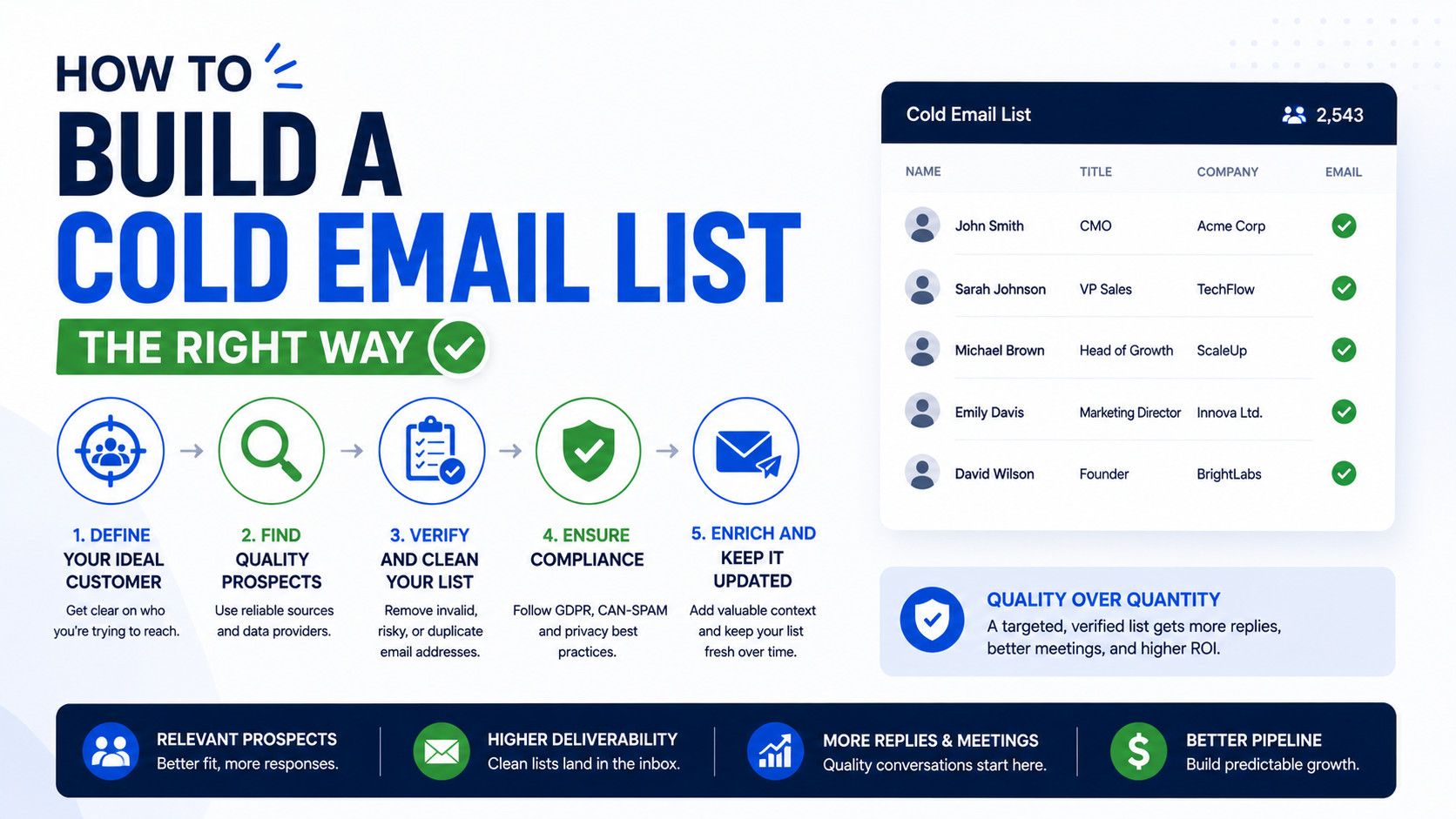
That is how you build a cold email list the right way.
Not by collecting the most addresses.
By collecting the right ones.