The first time I saw a business lose a customer because of scheduling problems, it was surprisingly simple.
A potential client sent a message asking:
“Can I book a consultation tomorrow?”
The business owner replied several hours later.
By that time, the customer had already contacted another company.
Nothing was wrong with the service.
The pricing was competitive.
The team was experienced.
The problem was the booking process.
The customer wanted a quick answer and an easy way to schedule.
Instead, they had to wait for a reply, check availability manually, and go back and forth through messages.
This is a common problem for small businesses.
Many owners think appointment booking tools are only useful for large companies.
That is not true.
A simple booking system can save hours every week, reduce missed appointments, and make it easier for customers to take the next step.
Over the years, I have tested different scheduling platforms for service businesses, consultants, agencies, and local companies.
One thing became clear:
The best appointment booking tool is not necessarily the one with the most features.
It is the one that matches how your business actually works.
A solo consultant has different needs from a dental clinic.
A fitness trainer needs something different from a home service company.
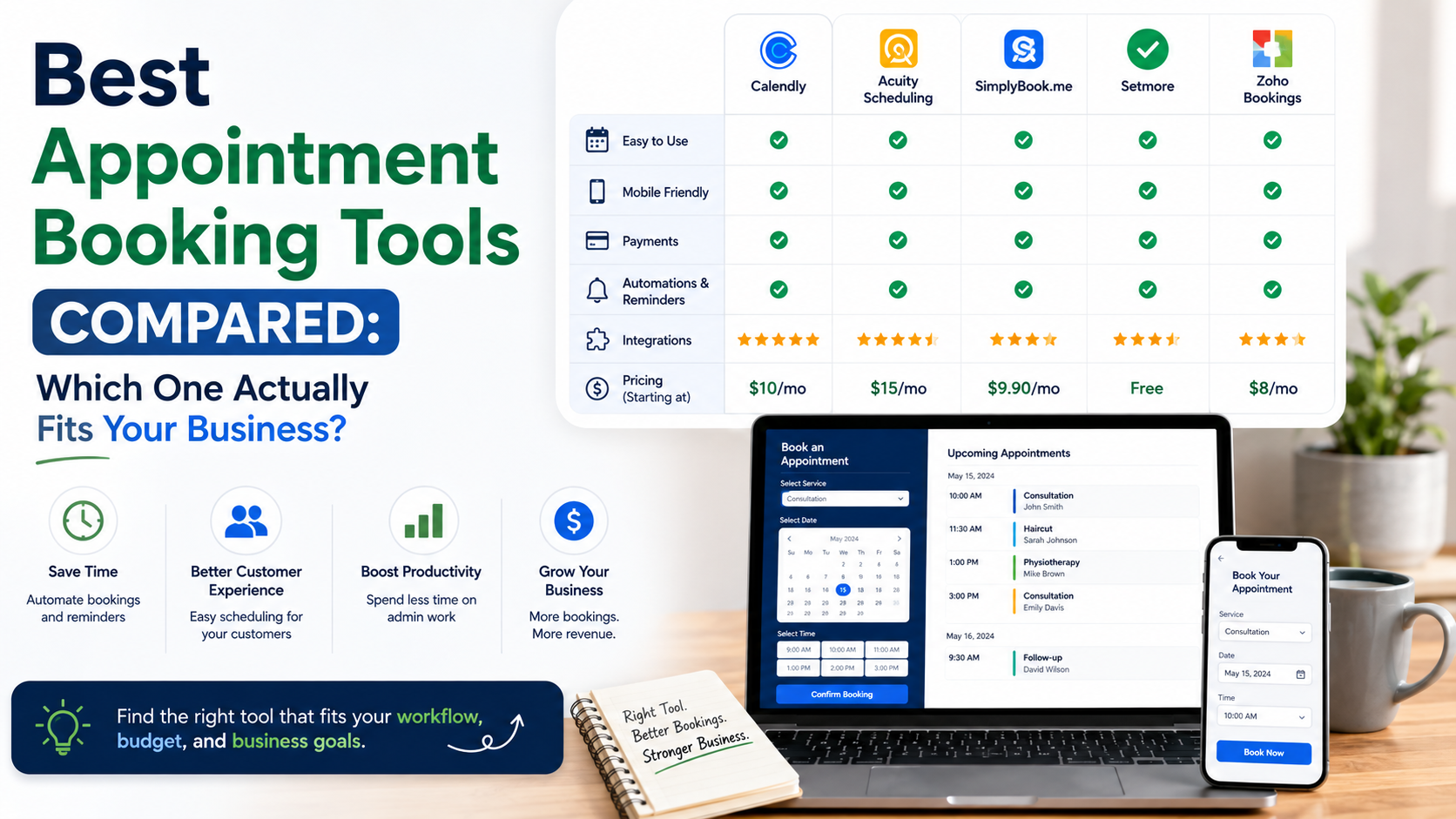
In this guide, I will compare the best appointment booking tools, where they work well, and what mistakes to avoid when choosing one.
Why Appointment Booking Tools Matter for Small Businesses
Before these tools became popular, many businesses managed appointments through:
- Phone calls
- Emails
- Spreadsheets
- Social media messages
This works when you have a few customers.
But as demand grows, problems appear.
Common issues include:
- Double bookings
- Missed appointments
- Slow responses
- Manual reminders
- Time wasted managing calendars
An appointment booking tool creates a smoother process.
A customer can:
Visit website
↓
Choose available time
↓
Confirm booking
↓
Receive reminder
↓
Attend appointment
No unnecessary messages.
No waiting.
What Makes a Good Appointment Booking Tool?
Not every scheduling platform is created equally.
Here are the features that actually matter.
Easy Customer Booking
The booking process should be simple.
Customers should not need to create complicated accounts or complete unnecessary forms.
Calendar Integration
A good tool should connect with calendars like:
- Google Calendar
- Outlook Calendar
- Apple Calendar
This prevents scheduling conflicts.
Automatic Reminders
Reminder emails and messages reduce missed appointments.
This is especially useful for:
- Clinics
- Consultants
- Salons
- Service providers
Payment Options
Some businesses need customers to pay during booking.
Examples:
- Coaching sessions
- Classes
- Consultations
Payment integration can make the process smoother.
Customization
Your booking page should match your brand.
Customers should feel like they are booking directly with your business.
1. Calendly: Best Overall Appointment Booking Tool
Calendly is probably the most recognized scheduling platform.
I have seen it used by:
- Consultants
- Sales teams
- Agencies
- Freelancers
The reason is simple:
It removes unnecessary back-and-forth communication.
How Calendly Works
You create availability rules.
Example:
Monday to Friday
10 AM to 4 PM
Customers see available times.
They choose a slot.
The appointment is added automatically.
Where Calendly Works Well
Imagine a marketing consultant receiving several meeting requests every week.
Instead of:
“Are you free Tuesday?”
“No, how about Thursday?”
“Maybe Friday?”
The customer simply books a suitable time.
Strengths
✓ Very easy setup
✓ Clean interface
✓ Great calendar integration
✓ Professional booking experience
Limitations
Some advanced features require paid plans.
Businesses needing complex scheduling may eventually need something more specialized.
Best For:
✓ Consultants
✓ Freelancers
✓ Sales teams
✓ Agencies
2. Acuity Scheduling: Best for Service-Based Businesses
Acuity Scheduling is popular among businesses that sell appointments as a service.
Examples:
- Therapists
- Coaches
- Beauty professionals
- Fitness trainers
Why Acuity Stands Out
It offers more service-focused features.
You can manage:
- Different appointment types
- Client intake forms
- Payments
- Packages
Example
A fitness coach may offer:
30-minute consultation
↓
60-minute training session
↓
Monthly coaching package
Acuity handles these different options better than simple scheduling tools.
Best For:
✓ Coaches
✓ Wellness professionals
✓ Appointment-based businesses
3. Square Appointments: Best for Local Businesses
Square offers Square Appointments as part of its business tools.
It is especially useful for businesses that already use Square payments.
Where It Works Well
Examples:
- Salons
- Barbers
- Beauty services
- Retail businesses offering appointments
Useful Features:
- Online booking
- Payment processing
- Customer management
- Staff scheduling
Real-World Advantage
Many small businesses prefer fewer tools.
Instead of using:
One payment system
One booking system
One customer database
Square combines these functions.
Best For:
✓ Local service businesses
✓ Appointment + payment needs
✓ Small teams
4. Setmore: Best Budget-Friendly Option
Setmore is a popular option for small businesses looking for affordable scheduling.
It provides:
- Booking pages
- Calendar management
- Customer reminders
- Video appointments
Why Businesses Choose It
Many small businesses do not need advanced systems.
They need something that simply works.
Setmore provides the basics without overwhelming users.
Best For:
✓ Small teams
✓ Beginners
✓ Budget-conscious businesses
5. Zoho Bookings: Best for Businesses Already Using Zoho
Zoho offers Zoho Bookings as part of its larger business ecosystem.
It connects well with other Zoho products.
Examples:
- Zoho CRM
- Zoho Calendar
- Zoho Meetings
Where It Helps
A company already using Zoho can create a connected workflow.
Example:
Customer books meeting
↓
Lead enters CRM
↓
Sales team follows up
Best For:
✓ Growing businesses
✓ Companies using Zoho products
✓ CRM-focused teams
6. HubSpot Meetings: Best for Sales Teams
HubSpot includes meeting scheduling inside its CRM platform.
This is different from traditional booking tools.
The focus is not only scheduling.
It is managing customer relationships.
Example
A potential customer books a sales call.
The information automatically connects with the CRM.
The sales team can see:
- Previous interactions
- Emails
- Customer history
Best For:
✓ B2B companies
✓ Sales teams
✓ CRM users
Appointment Booking Tool Comparison Table
| Tool | Best For | Main Strength | Possible Challenge |
| Calendly | Consultants and teams | Simple scheduling | Advanced features cost more |
| Acuity | Service providers | Appointment customization | More complex setup |
| Square Appointments | Local businesses | Payments + bookings | Best inside Square ecosystem |
| Setmore | Small businesses | Affordable scheduling | Fewer advanced features |
| Zoho Bookings | Zoho users | Business integration | Less useful outside Zoho |
| HubSpot Meetings | Sales teams | CRM connection | Overkill for simple bookings |
How to Choose the Right Appointment Booking Tool
The right tool depends on your business model.
Step 1: Understand Your Booking Type
Ask:
What are customers booking?
Simple Meetings
Examples:
- Sales calls
- Consultations
- Interviews
Calendly may be enough.
Service Appointments
Examples:
- Haircuts
- Training sessions
- Therapy sessions
Acuity or Square may fit better.
Sales Process
Examples:
- B2B consultations
- Product demos
HubSpot can provide more value.
Step 2: Consider Your Team Size
A solo professional needs simplicity.
A team needs:
- Multiple calendars
- Staff management
- Different availability rules
Choose accordingly.
Step 3: Check Your Existing Tools
Avoid creating unnecessary complexity.
If you already use:
Google Workspace
↓
Choose tools with Google Calendar integration.
If you use:
Zoho CRM
↓
Zoho Bookings makes more sense.
If you use:
Square payments
↓
Square Appointments may be easier.
Common Appointment Booking Mistakes
1. Making the Booking Process Too Long
Every extra step creates friction.
Only ask for information you actually need.
2. Not Setting Reminders
Customers forget.
Automatic reminders are one of the simplest ways to reduce missed appointments.
3. Ignoring Mobile Users
Many customers will book from their phones.
Always test your booking page on mobile.
4. Offering Too Many Appointment Options
Too many choices create confusion.
Keep options clear.
Example:
Bad:
- Quick call
- Short meeting
- Mini consultation
- Basic discussion
Better:
- Free Consultation
- Paid Strategy Session
5. Forgetting the Customer Experience
A booking system is part of your brand.
A confusing booking page creates a poor first impression.
My Personal Recommendations
If I was choosing today:
For Freelancers and Consultants:
Calendly
Simple, professional, and easy.
For Appointment-Based Services:
Acuity Scheduling
Better customization.
For Local Businesses Taking Payments:
Square Appointments
Everything stays connected.
For Small Businesses on a Budget:
Setmore
Good basic functionality.
For Sales Teams:
HubSpot Meetings
Best when scheduling connects with customer management.
Final Thoughts
A good appointment booking tool does something simple:
It removes unnecessary friction between a customer and your business.
The best systems are usually the ones customers barely notice.
They choose a time, receive confirmation, get reminders, and show up.
That is the goal.
Do not choose a booking tool because it has the longest feature list.
Choose one that fits your workflow.
A simple scheduling system that your team actually uses will always be more valuable than an advanced platform that creates more work.
The right appointment booking tool saves time, improves customer experience, and helps small businesses capture opportunities they might otherwise lose.