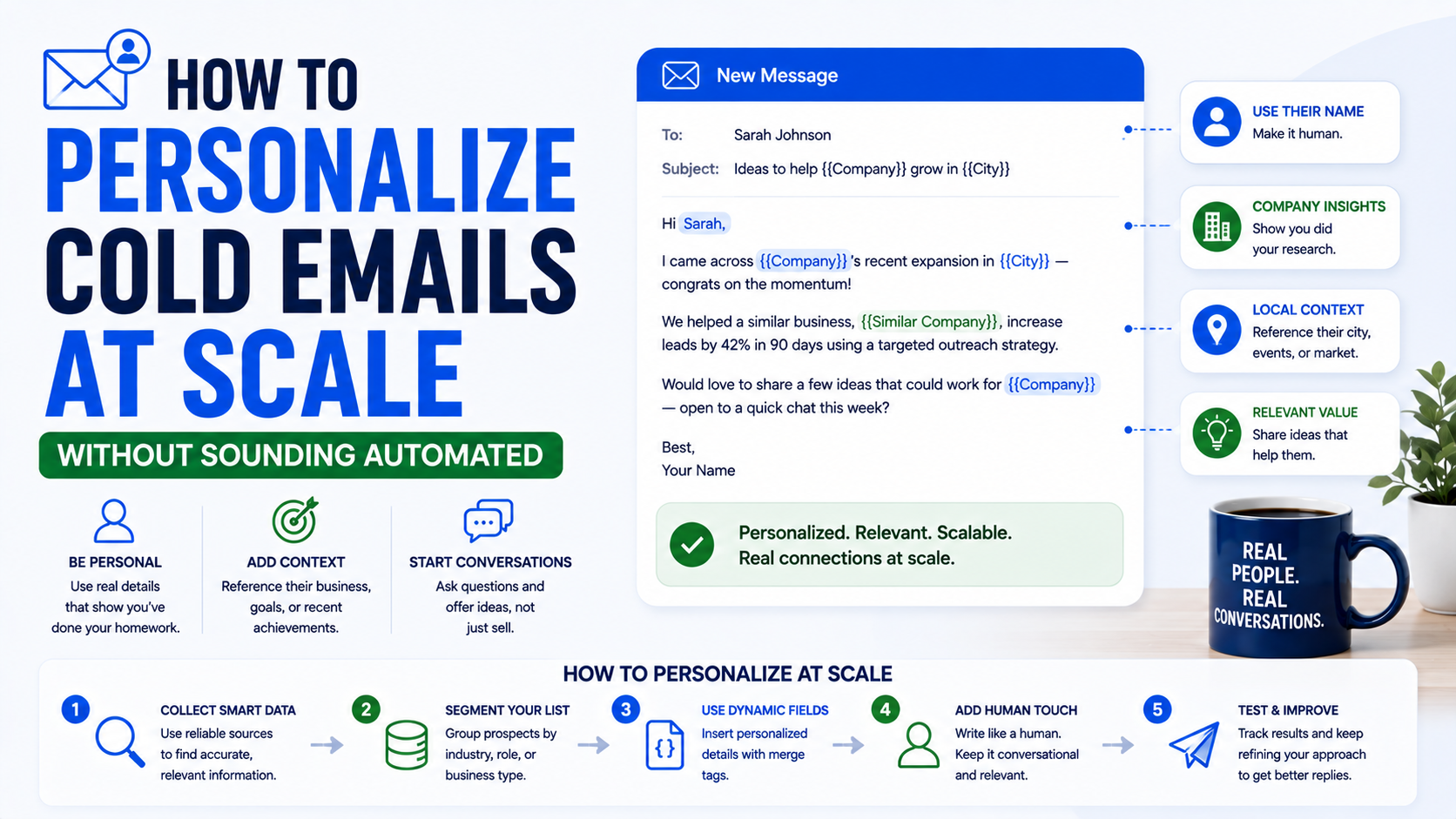
The first time I tried to personalize a large cold email campaign, I made the mistake most people make.
I added the prospect’s first name.
Then I added their company name.
Then I proudly looked at the spreadsheet and thought, “Great. These are personalized now.”
They weren’t.
The emails still sounded like mass outreach because everything after the first sentence was identical.
“Hi Sarah, I came across Acme Roofing and wanted to reach out…”
Replace Sarah with James and Acme Roofing with Smith Dental, and the exact same email still worked.
That is usually a sign that you are using merge fields, not personalization.
Real cold email personalization gives someone a reason to believe you contacted them specifically because something about their business made them relevant.
The challenge is doing that when you have 50, 500, or 5,000 prospects.
You obviously cannot spend 20 minutes researching every person.
But blindly sending the same message to thousands of people usually creates another problem: your outreach starts sounding like everyone else’s.
The middle ground is where things get interesting.
You build a repeatable system that collects a few useful details, groups prospects intelligently, and changes only the parts of the email that actually matter.
That is how I think about personalization at scale.
First, Understand What Personalization Actually Means
Personalization does not mean mentioning random facts.
I regularly see outreach like this:
“Hi David, I saw that you went to the University of Texas. Hook ’em! Anyway, we help companies reduce software development costs…”
Technically, that email is personalized.
Practically, the personalization has nothing to do with the reason for the message.
It feels forced.
Useful personalization should answer one question:
Why are you contacting this person?
For example:
“I noticed you recently opened a second dental clinic in Austin.”
That could be relevant if you sell local SEO, appointment software, staffing services, bookkeeping, or commercial insurance.
Or:
“I saw that your team is hiring three React developers.”
That could be relevant if you provide recruiting, development outsourcing, HR software, or technical assessment tools.
The best personalization usually connects an observable situation to the problem your service solves.
That connection is more important than simply proving you researched the person.
The Three Levels of Cold Email Personalization
I find it useful to think about personalization in three levels.
Level 1: Basic Personalization
This includes information like:
- First name
- Company name
- Job title
- Location
- Industry
Almost every outreach platform can insert these automatically.
A basic email might say:
“Hi Daniel,
I work with accounting firms in Chicago and came across Miller & Co.”
Nothing wrong with that.
But it is weak personalization because the same message could probably go to hundreds of similar companies.
Level 2: Segment-Based Personalization
This is where cold outreach starts becoming more useful.
Instead of treating every prospect the same, you create separate messages based on meaningful characteristics.
For example:
Roofing companies with poor Google Maps visibility get one message.
Roofing companies running paid ads but using weak landing pages get another.
Roofing companies with recently opened locations get another.
Now your email matches the prospect’s situation.
This is one of the easiest ways to improve personalization without manually writing every message.
Level 3: Prospect-Specific Personalization
This is the most detailed level.
You might mention:
- A recent LinkedIn post
- A new office
- A job opening
- A website issue
- A recent funding announcement
- A product launch
- A specific Google review pattern
- A ranking opportunity
- Technology used on the website
This takes more research, but you do not necessarily need to do all of it manually anymore.
The trick is deciding which prospects deserve this level of attention.
Do Not Personalize Every Lead the Same Way
This was one of the more useful lessons I learned.
Not every prospect deserves five minutes of research.
If you have a list of 2,000 companies, some of them will be far more valuable than others.
I usually prefer separating prospects into rough tiers.
Your highest-value prospects might get manual research.
Mid-level prospects might get automated enrichment plus a quick human review.
Lower-value prospects may receive segment-based personalization.
For example:
Tier A
High-value account.
You manually check:
- Website
- Recent company activity
- Leadership
- Current priorities
You write a specific opening.
Tier B
Good-fit account.
Your system collects:
- Industry
- Size
- Location
- Website technology
- Recent hiring
- Relevant service pages
You generate a personalized angle and quickly review it.
Tier C
Broader prospect list.
You use:
- First name
- Company
- Industry
- Location
- One segment-specific pain point
This keeps research costs sensible.
Spending ten minutes researching a prospect who could become a $20,000 client makes sense.
Spending ten minutes researching someone who might buy a $50 product usually does not.
Start With Better Segmentation Before Adding More Automation
When people hear “personalization at scale,” they often immediately start looking for AI tools.
I would start with the spreadsheet.
If your prospect list is messy, automation will simply produce personalized messages for badly targeted people.
Suppose you sell SEO services.
Instead of creating one giant list called:
“Small Businesses”
break it into categories like:
- Dentists
- Lawyers
- Roofing companies
- HVAC companies
- Real estate agencies
- Accounting firms
Then go deeper.
For dentists:
- One location
- Multiple locations
- Strong reviews but weak rankings
- Running Google Ads
- Recently opened
- Website redesign needed
Suddenly your copy becomes easier to write.
A dentist with 250 reviews but poor local visibility has a different problem from a new dental clinic with 12 reviews.
Both may need SEO.
But they should not receive the same email.
Build Personalization Around Signals
The easiest cold email campaigns to personalize are based on signals.
A signal is simply something observable that suggests a company may have a particular need.
Some useful signals include:
- Hiring activity
- New location
- Funding
- New product launch
- Leadership change
- Poor website performance
- Outdated design
- Low search visibility
- Heavy advertising activity
- Technology change
- Expansion into a new market
- Increase in employee count
For example, imagine you sell recruitment services.
“Software companies” is a broad audience.
“Software companies currently hiring five or more engineers” is much stronger.
Your email could say:
“Hi Alex,
I noticed your team has several engineering roles open right now, including two backend positions.
We help SaaS companies add vetted developers when internal hiring is taking longer than the roadmap allows.
Is the current hiring push tied to a specific delivery deadline?”
The personalization is not decorative.
It creates the reason for the conversation.
Use a Spreadsheet as Your Personalization Engine
You can build a surprisingly good workflow inside Google Sheets.
I often think in columns.
You might have:
First Name
Last Name
Company
Website
Industry
Location
Employee Count
Job Title
Personalization Signal
Pain Point
Personalized Opening
Offer
CTA
Then each row becomes the raw material for an email.
For example:
Company: Bright Roofing
Location: Dallas
Signal: Running Google Ads
Observation: Quote page has a long mobile form
Pain Point: Paid traffic may be dropping before submitting
Opening: “I noticed you’re running ads for roof replacement in Dallas and took a look at the quote page on mobile.”
That is much stronger than generating a compliment based on the homepage.
Where Tools Like Apollo and Clay Fit In
Once your list becomes larger, manual research gets difficult.
This is where enrichment tools become useful.
Apollo can help build prospect lists based on company and contact information.
LinkedIn Sales Navigator is useful when you need more control over job titles, company types, seniority, and professional profiles.
Clay is especially useful when your workflow requires combining data from multiple sources and turning that information into structured personalization.
For example, a Clay workflow might:
Find companies matching your criteria.
Find the right contact.
Check their website.
Identify hiring activity.
Pull company descriptions.
Find relevant LinkedIn information.
Create a short research summary.
Generate a suggested opening line.
You can then push the final data into your outreach platform.
The important part is that the workflow should begin with a clear personalization strategy.
Do not start with:
“What information can Clay find?”
Start with:
“What information would actually change my email?”
That distinction saves a lot of unnecessary enrichment costs.
AI Can Help, but It Needs Good Inputs
AI-generated personalization can be useful.
It can also create some painfully awkward cold emails.
A bad workflow asks AI:
“Write a personalized compliment for this company.”
You may get something like:
“I was truly impressed by your commitment to excellence and innovative approach to delivering outstanding customer experiences.”
That sentence says absolutely nothing.
A better prompt is based on structured information.
For example:
“Based on the company website information below, identify one specific business observation relevant to local lead generation. Do not compliment the company. Do not invent facts. Keep it under 20 words.”
The quality difference is huge.
AI is generally much better when you ask it to identify a specific signal than when you ask it to “personalize” vaguely.
Always Keep a Human Review Step for Important Accounts
Automation creates strange mistakes.
A company closes.
Someone changes jobs.
A website is being redesigned.
AI misinterprets a page.
A company named “Apple Roofing” somehow triggers a sentence about Apple Inc.
These things happen.
For higher-value prospects, I would never completely remove human review.
Even a 15-second check can catch obvious problems.
Read the opening.
Check the company.
Confirm that the observation makes sense.
Then send.
This is especially important when you are using AI-generated lines that refer to specific business details.
The more specific the personalization, the more embarrassing an incorrect statement becomes.
Avoid Fake Compliments
One of the biggest personalization mistakes is trying too hard to be nice.
“Love what you’re building!”
“Your website looks amazing!”
“Really impressed by your journey!”
“Your company is doing incredible work!”
These phrases appear in so many cold emails that they barely register anymore.
Specific observations work better.
Instead of:
“I love what you’re doing with your content.”
Try:
“I noticed most of your recent LinkedIn posts are focused on enterprise security teams.”
Instead of:
“Your website looks great.”
Try:
“I noticed the pricing page now separates enterprise and self-service plans.”
An observation feels credible because it proves you actually looked.
A compliment often feels automated because almost anyone could receive it.
Do Not Over-Personalize
There is another side to this.
Personalization can become creepy.
Imagine receiving:
“Hi Sarah, I noticed from your Instagram that you were in Barcelona last weekend…”
Then a sales pitch.
That is not useful personalization.
It feels invasive.
Stick to professional information that has a reasonable relationship to your offer.
Good sources include:
- Company websites
- Public LinkedIn activity
- Job listings
- Public business directories
- Press releases
- Public company information
- Industry news
- Public technology data
The fact that information is technically available does not mean it belongs in your cold email.
Use common sense.
Personalize the Problem, Not Just the Opening Line
This is where many scalable campaigns break.
The opening is personalized.
The rest of the email suddenly becomes generic.
Example:
“Hi Emma,
I noticed you recently opened your second clinic in Manchester.
We are a full-service digital marketing agency offering SEO, PPC, social media, web development, content marketing, branding, and reputation management…”
The first sentence was relevant.
Then the email forgot everything it knew about Emma.
A better version would continue the same idea:
“Hi Emma,
I noticed you recently opened your second clinic in Manchester.
When local businesses expand to multiple locations, Google Maps visibility gets a little more complicated because each location needs its own strong local signals.
We help multi-location clinics manage that side of local SEO.
Are both locations currently being managed through the same marketing setup?”
Now the entire email connects to the personalization signal.
Use Modular Email Copy
A useful way to scale personalization is by creating modules.
Instead of writing 1,000 complete emails, create interchangeable blocks.
For example:
Opening Module
Based on the signal.
Problem Module
Based on the industry or company situation.
Proof Module
Based on the closest relevant case study.
CTA Module
Based on the prospect’s likely level of awareness.
You might have three opening modules, four problem modules, three proof modules, and two CTAs.
That already gives you dozens of possible combinations without writing every email individually.
The result feels much more specific than one universal template.
Example: Personalized SEO Email at Scale
Imagine your campaign targets local roofing companies.
Your system identifies companies with strong review counts but weak organic visibility.
Email:
“Hi Chris,
I noticed Apex Roofing has more than 180 Google reviews, but a few local competitors with fewer reviews are still showing above you for several Dallas roofing searches.
We work with local contractors on exactly that gap between reputation and search visibility.
I took a quick look and spotted two areas I’d check first.
Worth sending them over?”
The personalized fields might be:
Chris
Apex Roofing
180 reviews
Dallas
The surrounding copy remains structured.
That is scalable personalization.
Example: Personalized Email for SaaS Companies
Signal:
Company is hiring frontend developers.
Email:
“Hi Maya,
I saw that your team is currently hiring two frontend engineers.
We work with SaaS companies that need additional React development capacity while permanent roles are still being filled.
Not sure if that is relevant for your team, but are those positions connected to a current product deadline?”
Again, most of the email can be templated.
The signal creates relevance.
Example: Website Design Outreach
Signal:
Website is difficult to use on mobile.
Email:
“Hi Tom,
I was looking through your landscaping site on mobile and noticed the quote form gets pushed quite far down the service pages.
We build lead-focused sites for local service companies, so that stood out immediately.
I have two simple layout changes I’d test before thinking about a full redesign.
Want me to send them over?”
This feels personalized because it references a real usability observation.
Keep Your Personalization Short
You do not need a paragraph proving you researched someone.
Usually one sentence is enough.
The purpose of personalization is to establish relevance quickly.
If the opening takes six lines, you may lose the reader before reaching the point.
Think:
One useful observation.
One relevant problem.
One clear offer.
One easy question.
That is usually enough.
Test Personalization Depth
More personalization does not automatically mean better results.
This surprised me.
Sometimes a deeply researched email does not perform much better than a well-segmented email.
Why?
Because the offer matters more.
You can write the perfect sentence about someone’s recent podcast appearance, but if your service is irrelevant, the email still fails.
Test different levels.
For example:
Campaign A:
First name + company + industry-specific message.
Campaign B:
Everything above + one business signal.
Campaign C:
Manual personalized observation.
Then compare:
Reply rate
Positive reply rate
Meetings
Qualified opportunities
Revenue
Do not judge personalization only by open rates.
A great personalization system should create better conversations, not just curiosity.
Watch for Automation Errors
Before launching a campaign, scan your data.
Common problems include:
Missing first names.
Company names written in all caps.
URLs appearing instead of company names.
Broken personalization lines.
Wrong industries.
Job titles that no longer exist.
Blank fields.
Weird punctuation.
One bad variable can create something like:
“Hi {{first_name}}, I noticed NULL recently opened a location in undefined.”
Nothing destroys the illusion of a personal email faster.
Most outreach platforms let you add fallback values.
Use them.
If a personalization field is missing, it is often better to use a simpler version of the email than risk sending broken text.
Do Not Let Personalization Destroy Deliverability
Personalization and deliverability are different problems.
You can create highly personalized emails and still have poor inbox placement if your technical setup is weak.
Make sure your sending domain is configured correctly.
Use proper SPF, DKIM, and DMARC records.
Keep bounce rates low.
Avoid sending large volumes from a brand-new mailbox.
Verify email addresses when appropriate.
Do not fill first-touch emails with attachments and unnecessary links.
And follow the commercial email rules that apply to your location and recipients.
Personalization should improve relevance.
It does not give you permission to ignore responsible sending practices.
Common Mistakes I Would Avoid
The biggest mistake is mistaking merge fields for personalization.
Another is trying to scrape every possible data point just because your tools allow it.
You also want to avoid:
Writing fake compliments.
Mentioning irrelevant personal information.
Using AI-generated observations without checking them.
Sending the same offer to completely different customer segments.
Making the personalized sentence much longer than the rest of the email.
Claiming you “analyzed” something you barely looked at.
Automating high-value prospects with zero human review.
The best personalization systems are usually simpler than people expect.
They use a small number of accurate, relevant signals extremely well.
A Practical Personalization Workflow
If I were building a campaign from scratch, I would do it like this.
First, define one narrow customer group.
For example:
“US dental practices with two or more locations.”
Second, decide what signals matter.
Maybe:
Poor local rankings.
Recent expansion.
High review count.
Running Google Ads.
Third, collect the data.
You can use LinkedIn, Google Maps, Apollo, Clay, spreadsheets, or other research tools depending on the campaign.
Fourth, create a personalization column.
Something like:
“Recently opened a second Austin location.”
Fifth, connect that signal to a problem.
“Multi-location businesses often struggle to manage local visibility consistently.”
Sixth, create your email structure.
Opening.
Problem.
Offer.
CTA.
Seventh, review a sample manually.
Read 20 emails.
If they sound strange, fix the workflow before sending 2,000 of them.
That final step saves a lot of pain.
The Best Scalable Personalization Still Feels Simple
The goal is not to make the prospect think:
“Wow, this person spent 45 minutes researching me.”
The goal is:
“This is actually relevant to what we’re doing.”
That is enough.
You do not need to mention someone’s college, favorite football team, podcast appearance, latest vacation, and company anniversary.
Find one useful business signal.
Connect it to something you genuinely solve.
Explain the value simply.
Ask a reasonable question.
Then let the conversation do the rest.
Personalization at scale works when the system behind the email is sophisticated but the email itself feels completely ordinary.
A person reads it and understands why you contacted them.
No gimmicks.
No fake familiarity.
No obvious mass-mail language.
Just the right message going to the right person for a reason that makes sense.
That is the kind of personalization worth scaling.