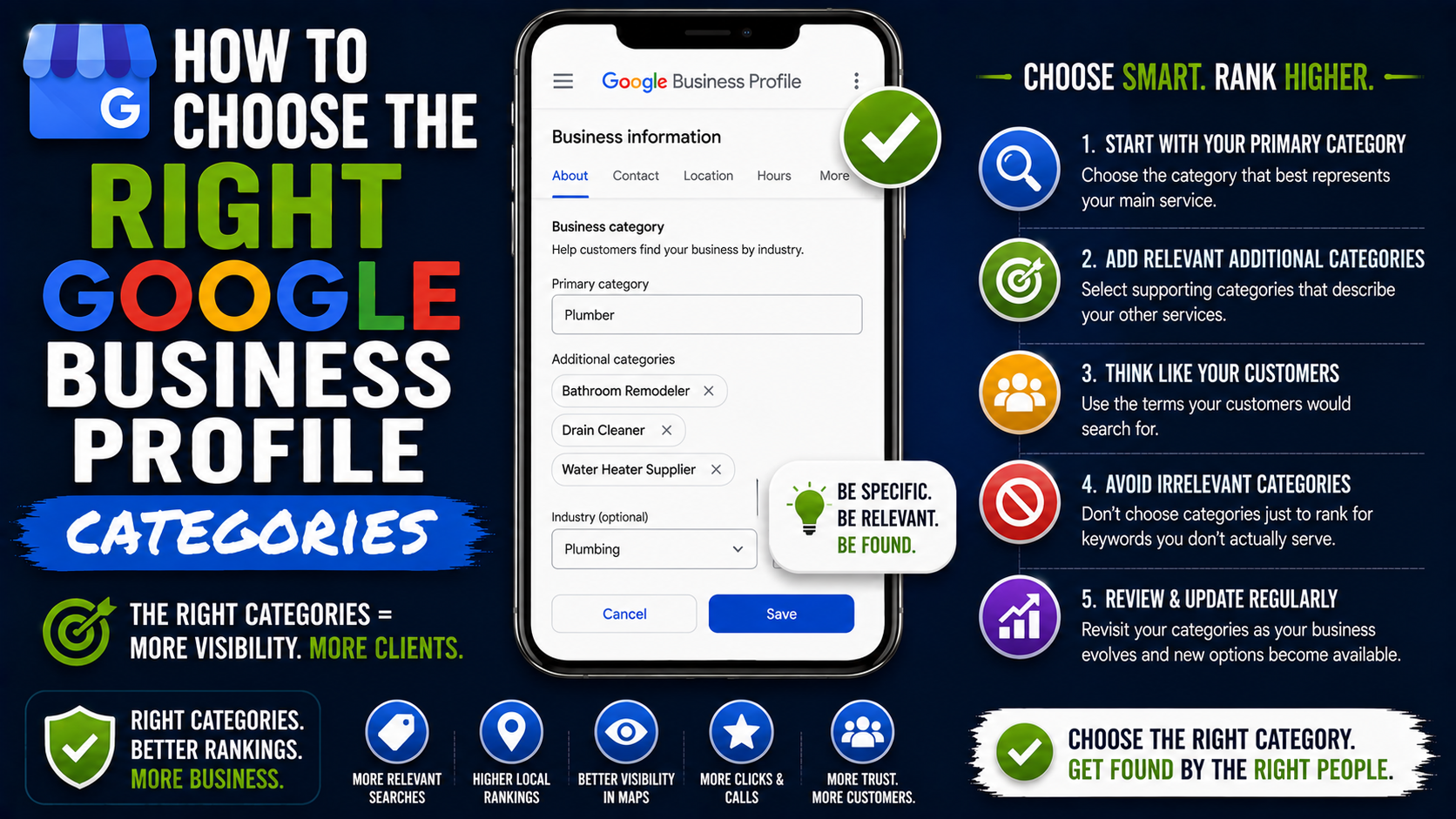
One of the easiest ways to make a Google Business Profile less effective is surprisingly simple: choose a category that sounds close enough and move on.
I’ve seen the logic behind it many times.
A contractor offers landscaping, patios, retaining walls, concrete work, and decks, so the owner thinks, “I’ll just add every category that seems related.”
Or a law firm chooses “Law Firm” because technically that is what the business is, even though most of its revenue comes from personal injury cases.
The profile looks complete.
Nothing appears broken.
But when you start checking the actual searches that matter, the business may be showing up for the wrong terms or struggling to compete where it should be strongest.
Google Business Profile categories are one of those small settings that can have a surprisingly large impact on local visibility. Google itself says the categories you select affect local ranking, and current local SEO industry research continues to place the primary GBP category among the strongest Local Pack ranking signals.
That does not mean changing one dropdown magically puts you at number one.
It means category selection gives Google an important clue about what your business actually is.
Getting that clue right matters.
Your Primary Category Is More Important Than It Looks
When setting up a Google Business Profile, you choose one primary category.
You can then add additional categories.
The primary category deserves most of your attention.
Think of it as the clearest answer to this question:
What type of business are you mainly operating?
Google recommends choosing the most specific category that accurately represents the main business. For example, if “Nail Salon” accurately describes the company, it is better than choosing a broader salon-related option simply because it covers more ground.
Google’s own category guidance gives another useful test.
Choose a category that completes:
“This business IS a…”
rather than:
“This business HAS a…”
That simple test prevents a lot of bad category choices.
For example:
A hotel is a hotel.
A hotel may have a restaurant, but that does not automatically mean the hotel itself should be categorized as a restaurant.
A landscaping company is a landscaper.
It may offer drainage installation, grading, sod replacement, mulch installation, and seasonal cleanup, but those individual services do not necessarily need their own business categories.
That distinction becomes important once you start adding additional categories.
Category and Service Are Not the Same Thing
This is probably the biggest source of confusion I see with GBP optimization.
Business owners often treat categories like keywords.
They are not.
Suppose you run an outdoor construction company offering:
- Interlocking driveways
- Paver patios
- Retaining walls
- Concrete patios
- Deck construction
- Sod installation
- Yard grading
- Drainage work
You should not automatically search Google Business Profile for a category representing every single service.
Some belong in the Services section instead.
Your categories describe the business types you legitimately operate as.
Your services describe what those businesses actually provide.
Google specifically advises businesses not to select a category for every product or service. Instead, it recommends using a relatively small number of categories that describe the core business.
That is an important distinction because stuffing every remotely related category into a profile can dilute how clearly you are describing the business.
Start With the Service That Actually Drives the Business
Here is a practical exercise I like much more than scrolling randomly through category options.
Ask yourself:
If I could receive leads for only one type of work over the next six months, what would I choose?
Your answer usually gets you much closer to the correct primary category.
Imagine a company offers:
Paver driveways.
Patios.
Walkways.
Concrete work.
Retaining walls.
General landscaping.
But 60% of its revenue comes from interlocking and paver installations.
Choosing Landscaper just because it sounds broader may not be the strongest representation of what that business is trying to sell.
A category closer to the primary hardscaping or paving operation may make more sense, depending on the categories Google currently makes available in that market.
Now imagine another company performs those same services, but most of its work comes from complete landscape construction projects.
In that case, Landscaper might make much more sense.
Same service list.
Different business model.
Different category strategy.
That is why copying another company’s categories without understanding its business can go wrong.
Look at What Google Already Rewards in Your Market
Google Maps itself is one of the most useful research tools for choosing categories.
You do not need an expensive SEO platform to start.
Search Google for the exact services you care about.
For example:
“interlocking contractor Toronto”
“emergency plumber Dallas”
“personal injury lawyer Chicago”
“HVAC repair near me”
“deck builder Hamilton”
Then study the businesses appearing repeatedly in the Local Pack and Google Maps results.
Do not blindly copy them.
Instead, look for patterns.
What primary categories appear frequently among businesses ranking for your target service?
Are specialists ranking more often than generalists?
Do businesses ranking for “deck builder” actually use Deck Builder as their category?
Does the same business also appear for patio-related searches?
Are the top companies using different categories depending on their primary specialty?
You are trying to understand Google’s existing category-to-search relationship.
This is much more useful than sitting in the GBP editor guessing which category “sounds SEO-friendly.”
Do Not Copy Only the Number-One Competitor
This is another mistake worth avoiding.
Imagine the top-ranking company for your keyword uses the category Landscaper.
You immediately change your primary category to Landscaper.
That is weak research.
The number-one result could be ranking because of a combination of proximity, reviews, website relevance, links, business prominence, its location, or other factors.
Instead, examine several businesses across several search terms.
I usually prefer looking for repeated patterns rather than one competitor.
For example:
Search 1: “paver contractor”
Search 2: “interlocking driveway contractor”
Search 3: “patio installation”
Search 4: “retaining wall contractor”
Search 5: “landscape construction”
Now compare which business categories repeatedly show up.
That gives you a much better picture.
Choose the Most Specific Accurate Primary Category
Google’s guidance is clear here: categories should be specific while still accurately representing the main business.
Specificity matters.
Consider a legal business.
These possible categories do not communicate exactly the same thing:
Law Firm
Personal Injury Attorney
Divorce Lawyer
Criminal Justice Attorney
Estate Planning Attorney
If a firm is genuinely focused on divorce and family law, choosing the closest specific category may help Google understand its relevance better than simply using the broadest available legal category.
The same idea applies in home services.
Compare:
Contractor
Concrete Contractor
Deck Builder
Roofing Contractor
Paving Contractor
A company should not select the most specific category simply because it wants to rank for that keyword.
It should select the most specific category that truthfully represents the business.
That last part matters.
Categories are not an SEO wish list.
How I Would Choose a Primary Category Step by Step
Here is a simple process you can actually use.
Step 1: List Your Main Revenue-Producing Services
Do not start with keywords.
Start with the business.
Write down your five to ten biggest services.
For example:
Driveway paving
Patio installation
Retaining walls
Concrete work
Deck construction
Landscaping
Then estimate which services generate the most revenue or leads.
You do not need perfect accounting data.
A rough percentage is enough.
Step 2: Identify Your Main Business Type
Ask which business type best represents those services collectively.
Do customers mainly think of you as:
a landscaper?
a paving contractor?
a concrete contractor?
a deck builder?
a masonry contractor?
This helps separate your core identity from secondary services.
Step 3: Check Available Google Categories
Go to your Business Profile and select:
Edit Profile → Business Category
Start typing possible categories and see what Google currently offers.
You cannot create a custom category just because the exact phrase you want is missing. Google requires you to select from its available categories. If the perfect option is unavailable, its guidance is to choose the closest broader category that accurately describes the business.
Step 4: Research Google Maps Results
Search your important commercial terms.
Record:
Keyword
Top businesses
Visible category
Location
Review count
Website
You can do this in a basic Google Sheet.
After 10 to 20 searches, patterns usually start becoming obvious.
Step 5: Compare Category Relevance to Revenue
Do not choose a category simply because competitors use it.
Ask whether it also aligns with the work you actually want.
If Deck Builder appears strongly for deck searches but decks account for only 5% of your business, making it your primary category could shift the profile away from your more important service area.
Step 6: Choose the Best Primary Category
Pick the category representing the strongest overlap between:
What the business actually is.
What generates revenue.
What customers search for.
What Google appears to associate with those searches.
That is a much stronger decision than choosing whichever category has the biggest search volume.
How to Choose Additional Categories
Once the primary category is right, additional categories become much easier.
Google currently allows businesses to use one primary category and up to nine additional categories, although Google’s guidance is not to fill every slot just because it exists. Use only categories that accurately describe the business.
Think of additional categories as legitimate secondary business identities.
For example, imagine a company genuinely performs substantial work across:
Landscaping
Masonry
Paving
Concrete
Deck construction
A profile might reasonably use a combination of relevant categories corresponding to those business activities.
But suppose that same company occasionally pressure-washes a patio after installation.
That does not necessarily mean Pressure Washing Service belongs on the profile.
One occasional add-on service does not automatically make you that type of business.
This is where restraint helps.
Google explicitly recommends using as few categories as necessary to describe the core business.
More Categories Do Not Automatically Mean More Rankings
This sounds obvious once you say it out loud, but it is tempting to think:
“If one category is good, ten must be better.”
Not necessarily.
Imagine an outdoor construction company adding:
Landscaper
Paving Contractor
Concrete Contractor
Masonry Contractor
Deck Builder
Fence Contractor
Excavating Contractor
Drainage Service
General Contractor
Snow Removal Service
Maybe all ten have some connection to jobs the company has performed.
But do all ten represent meaningful parts of the business?
That is the better question.
The goal should be topical accuracy, not maximum category count.
Current industry research does suggest that relevant additional categories can contribute to Local Pack visibility, but unrelated category expansion can create category confusion rather than a stronger profile.
Relevance wins over quantity.
Use Your Website to Confirm Your Category Choice
After choosing categories, open your website.
Pretend you know nothing about the company.
Would the website confirm the same business identity?
Suppose your primary GBP category is Concrete Contractor.
But your homepage talks almost entirely about landscaping.
Your navigation says:
Landscaping
Lawn Care
Garden Maintenance
Sod Installation
Mulching
And concrete appears once in the footer.
There is a mismatch.
That does not necessarily mean the GBP category is wrong.
Maybe the website is wrong.
Either way, it tells you that your local search signals are not telling a consistent story.
If concrete is genuinely the main business, the website should demonstrate that with appropriate pages, project examples, photos, service information, and internal links.
Your GBP should not be doing all the work by itself.
Match Services to the Relevant Categories
This is where category optimization becomes much more useful.
Instead of creating a random list of 30 GBP services, organize them logically.
For example:
Paving Contractor
Interlocking Driveway Installation
Interlocking Patio Installation
Driveway Paver Installation
Patio Paver Installation
Paver Repair
Paver Releveling
Paver Sealing
Concrete Contractor
Concrete Patio Installation
Concrete Walkway Installation
Concrete Driveway Installation
Concrete Repair
Concrete Sealing
Masonry Contractor
Stone Masonry
Retaining Wall Installation
Retaining Wall Repair
Outdoor Stone Steps
Masonry Repair
Landscaper
Sod Installation
Sod Replacement
Yard Grading
Landscape Installation
Drainage Installation
Now the profile develops a much cleaner topical structure.
Your categories describe the business types.
Your services reinforce what each side of the business actually does.
Your website can then support the same structure with relevant service pages.
That is a far better local SEO setup than throwing unrelated services into the profile and hoping Google figures it out.
Do Not Use Categories Like Keywords
Suppose you want to rank for:
“luxury kitchen remodeler”
But the available category is:
Kitchen Remodeler
You cannot create:
Luxury Kitchen Remodeler
Best Kitchen Remodeler
Kitchen Remodeler Near Me
Affordable Kitchen Remodeler
Google categories are predefined.
The keyword variations belong elsewhere: your website content, service pages, project descriptions, reviews that customers naturally write, and other relevant business information.
Trying to turn category selection into keyword stuffing misunderstands what the field is designed to do.
Be Careful When Changing an Established Primary Category
Category testing can be useful, but I would not treat an established GBP like a playground.
Changing the primary category can change how Google understands the business.
Google also warns that adding or editing categories can sometimes trigger another business verification request.
So document what you are doing.
Before making an important category change, record:
Current primary category
Additional categories
Current Local Pack rankings
Calls or leads
Website clicks
Direction requests, if relevant
Important keyword positions
Then make the change and monitor what happens.
Do not change five major GBP elements on the same day if you are trying to understand which adjustment affected performance.
You want usable data, not chaos.
Category-Specific Features Are Another Clue
Categories do more than influence how Google understands the business.
Google notes that certain categories can unlock category-specific profile features.
Restaurants may receive menu, reservation, or ordering functionality.
Health and beauty businesses may receive booking-related options.
Hotels have accommodation-specific features.
So if changing a category suddenly changes the fields available inside your profile, that is not necessarily a bug.
Your category influences how Google treats the listing.
Common Mistake: Choosing the Broadest Possible Category
Business owners sometimes assume broad means more visibility.
For example:
“Why choose Deck Builder? Contractor covers everything.”
Because covering everything is not always the point.
You want Google to understand what you are specifically relevant for.
Broad categories can make sense when no accurate specific category exists.
But if a specific category genuinely describes your main operation, Google’s own guidance recommends selecting the specific option.
Common Mistake: Adding Categories for Services You Barely Offer
You installed one fence last year.
That does not necessarily make Fence Contractor a meaningful category.
You cleaned one driveway.
That does not automatically make Pressure Washing Service appropriate.
Use categories for established parts of the business, not every task someone on the crew knows how to perform.
Ask yourself:
Would I build an entire landing page around this service?
Would I actively advertise it?
Would I be happy receiving ten leads for it tomorrow?
Does the business regularly perform this work?
If most answers are no, think carefully before making it a category.
Common Mistake: Copying Competitors Without Checking Their Business
Competitor research is useful.
Competitor imitation is not.
A competitor may:
Have different revenue priorities.
Offer services you do not.
Have an outdated category setup.
Be testing categories.
Rank despite poor optimization because it has enormous prominence.
Operate under different licensing or business structures.
Use competitor categories as evidence, not instructions.
Common Mistake: Ignoring Regional Differences
A category strategy that works for one market may not transfer perfectly to another.
Customer terminology changes.
Competition changes.
Google’s available categories and the way businesses describe themselves can also evolve over time.
That is why I prefer checking the actual Google results in the target city instead of relying entirely on an old category list from a blog post.
If you are optimizing a business in Toronto, investigate Toronto.
If the client is in Miami, investigate Miami.
Local SEO should actually be local.
Common Mistake: Setting Categories Once and Never Reviewing Them
Businesses evolve.
Maybe a landscaping company gradually moves into hardscape construction.
Maybe a general dentist becomes heavily focused on cosmetic dentistry.
Maybe a remodeling company stops doing general renovations and focuses almost entirely on kitchens.
If the company’s services and revenue model change significantly, its category strategy deserves another look.
The category you chose three years ago is not automatically the category you should use forever.
Google’s available categories can also change, which makes occasional reviews worthwhile. BrightLocal’s category guide notes that Google adds and removes category options over time.
I would not constantly change categories just for the sake of “freshness.”
Review them because the business or search environment has actually changed.
A Simple Category Audit You Can Do Today
Open your Google Business Profile and write down:
Primary category:
[Your current category]
Additional categories:
[Current additional categories]
Then answer these questions:
Does my primary category describe the main business?
Is there a more specific accurate category available?
Does my primary category align with my highest-value service?
Are my additional categories genuine parts of the business?
Have I added categories simply because I want to rank for those keywords?
Do my GBP services support these categories?
Does my website support the same service topics?
What categories appear repeatedly among businesses ranking for my important searches?
Are there categories I added years ago that are no longer relevant?
That 15-minute audit can reveal more than endlessly rewriting the business description.
Do Categories Guarantee Better Local Rankings?
No.
That is an important expectation to set.
Google local rankings are not determined by category alone.
Google evaluates local results using multiple signals, and businesses are affected by things such as relevance, distance, prominence, reviews, website signals, location, competition, and other factors.
Industry research, however, continues to show why category selection deserves serious attention. Whitespark’s 2026 Local Search Ranking Factors survey ranked the primary GBP category as the number-one Local Pack/Maps ranking factor among the participating local SEO experts, with additional categories also appearing high in the survey.
That does not mean:
“Change your category and rank number one tomorrow.”
It means:
“Do not handicap your profile with the wrong category.”
There is a big difference.
Final Thoughts
Choosing Google Business Profile categories becomes much easier once you stop thinking of them as keywords.
Your primary category should clearly describe what the business mainly is.
Additional categories should represent genuine secondary areas of the business.
Your services should explain what you actually do.
And your website should reinforce the same story.
When I look at category strategy from that angle, the decision becomes much less complicated.
You are not trying to select every possible phrase a customer might search.
You are helping Google accurately understand the business.
Start with your highest-value services.
Study the Local Pack for the searches that actually generate customers.
Choose the most specific accurate primary category.
Add only genuinely relevant secondary categories.
Then make sure your services and website support those choices.
The best category setup usually does not look clever.
It looks obvious.
A potential customer sees the profile and immediately understands what the company does.
Google sees the same thing.
That is exactly what you want.