You open a local contractor’s Google Business Profile and immediately see a blurry truck photo, a cropped company logo, two stock images of smiling construction workers, and a picture a customer accidentally uploaded of their lunch.
Then you open the competitor’s profile.
There is a clear photo of the storefront, several recent projects, the crew working on-site, close-ups of finished work, and a few before-and-after shots.
Before reading a single review, which company feels more trustworthy?
Probably the second one.
That is why I think photos are one of the most underrated parts of a Google Business Profile.
Not because uploading 50 pictures is some secret trick that instantly pushes you to the top of Google Maps. It isn’t.
Photos matter because people use them to answer very basic questions:
Is this a real company?
Does their work look good?
What does the place look like?
Will I recognize it when I arrive?
Do they actually provide the service I’m searching for?
Can I picture myself buying from them?
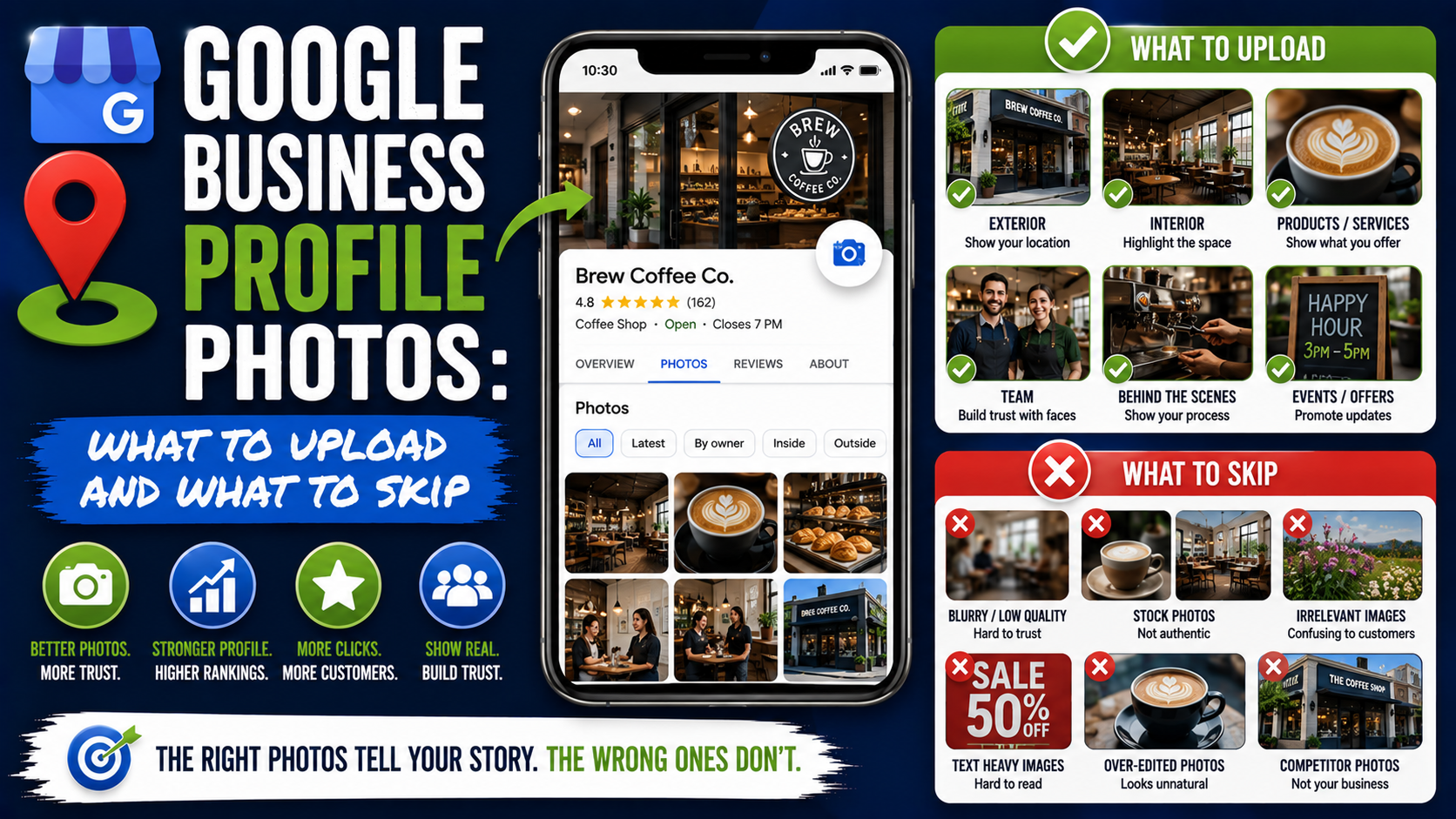
Google itself recommends adding business-specific photos because they help customers understand your business and can make your profile stand out. Its current guidance suggests photos of things such as your exterior, interior, products, services, common areas, rooms, and team depending on the type of business.
The difficult part is not knowing that you need photos.
It is knowing which photos are worth uploading and which ones should stay in your camera roll.
Let’s break that down.
Start With What a Customer Actually Wants to See
A common mistake is treating a Google Business Profile like a company brochure.
Businesses upload:
- Three versions of the logo
- Promotional graphics
- Award badges
- Generic stock photos
- Inspirational quotes
- Sale banners
- Flyers covered in text
Then there are barely any real pictures of the business.
I would reverse that completely.
When choosing a photo, ask:
Does this image help a potential customer understand, find, evaluate, or trust the business?
If the answer is yes, it is probably worth uploading.
If the image exists mainly because somebody wanted to fill space, skip it.
1. Upload Clear Exterior Photos
Exterior photos are especially important for businesses customers physically visit.
Imagine someone has booked their first appointment at your dental clinic.
They arrive on a busy street where several businesses share similar signage.
A clear photograph of your entrance can save them five minutes of driving around wondering whether they are in the right place.
Google specifically recommends exterior photos for this reason. Its guidance suggests adding at least three strong exterior images and capturing the business from directions customers are likely to approach.
Good exterior photos can show:
- Your main entrance
- Building signage
- Parking area
- Street-facing view
- Entrance from another direction
- Accessibility entrance
- Building appearance during different times of day
Try to take the photo from a customer’s perspective.
A drone photograph showing your building from 400 feet in the air may look impressive, but it does not necessarily help someone recognize the entrance from the street.
For a storefront, I would rather have one clear ground-level photo where the business name is visible.
2. Show the Inside of Your Business
If customers enter your location, show them what they will walk into.
This is especially valuable for:
- Restaurants
- Dental offices
- Medical clinics
- Salons
- Gyms
- Hotels
- Cafés
- Retail stores
- Spas
- Law offices
- Coworking spaces
Google recommends at least three interior photos for businesses where the inside environment matters.
You do not need professional architectural photography for every picture.
A modern phone camera can produce perfectly usable images if you pay attention to lighting and composition.
Clean the area first.
Turn on the lights.
Straighten chairs.
Remove random boxes, cables, cleaning equipment, and personal items.
Then take the photo from a natural standing height.
One small lesson here: wide-angle phone cameras can be useful, but do not overdo them.
An ultra-wide photograph that makes a small waiting room look like a hotel lobby may create the wrong expectation.
Your photos should make the business look good without misrepresenting reality.
That lines up with Google’s current quality guidance: photos should be clear, well lit, and free of significant alterations or excessive filters. Google says the image should represent reality.
3. Upload Photos of Your Actual Work
For service businesses, this would be near the top of my list.
If you install patios, show patios.
If you paint houses, show finished painting projects.
If you detail cars, show detailed cars.
If you install flooring, show the flooring.
Customers want proof.
Let’s say two landscaping companies both claim:
“Professional interlocking patio installation.”
Company A has a logo, one truck photo, and three stock garden images.
Company B has 20 real patio projects showing different paver styles, layouts, steps, retaining walls, and finished yards.
Company B has given the customer far more information.
Good project photos might include:
- Completed work
- Before-and-after comparisons
- Work in progress
- Close-up craftsmanship
- Different materials
- Different project sizes
- Different service types
- Equipment being used
- Finished result from multiple angles
Do not upload 18 nearly identical photos of the same driveway from two feet apart.
Choose the strongest images.
Quality and variety are more useful than filling the profile with duplicates.
4. Show Your Products Clearly
Product photos are valuable for businesses where people care about what is physically available.
Think:
- Bakeries
- Florists
- Furniture stores
- Clothing stores
- Jewelry stores
- Restaurants
- Auto dealerships
- Hardware stores
- Home improvement showrooms
Show actual products customers can buy.
A bakery should show real cakes, bread, pastries, and custom orders.
A restaurant should show dishes customers can actually order.
A furniture showroom should show real inventory or representative products available through the business.
Avoid using heavily edited product images that look completely different from what the customer receives.
There is nothing wrong with improving lighting or cropping an image.
The problem starts when editing changes the actual appearance of the product.
Google’s photo guidance emphasizes images that truthfully represent reality rather than heavily altered or excessively filtered pictures.
5. Upload Photos of Your Team
People like seeing who they may be dealing with.
This is especially useful for businesses where trust matters:
- Contractors
- Consultants
- Dentists
- Attorneys
- Real estate firms
- Agencies
- Medical practices
- Home-service companies
- Financial professionals
Google specifically recommends team photographs and suggests showing management and employees in a way that gives the business a more personal side.
Do not feel like every team photograph needs to look like a corporate annual report.
You can upload:
- Team group photos
- Staff working
- Technician on a job
- Chef preparing food
- Designer reviewing plans
- Contractor speaking with a homeowner
- Reception team
- Staff at a company event
There is one important rule here:
Respect privacy.
Do not upload recognizable customers, employees, children, license plates, paperwork, screens, addresses, or sensitive information without considering whether you have permission and whether the information should be public.
Google’s Maps content rules prohibit certain personal information being posted without consent.
6. Use Before-and-After Photos When the Transformation Matters
For certain industries, before-and-after photos are probably some of the best content you can upload.
Examples include:
- Landscaping
- Painting
- Pressure washing
- Remodeling
- Concrete repair
- Flooring
- Auto detailing
- Roofing
- Cleaning
- Restoration
- Interior design
The reason is simple.
A finished photo tells me what you produced.
A before-and-after pair tells me what you changed.
Imagine a badly sunken interlocking patio.
The first photo shows uneven pavers with weeds growing through the joints.
The second shows the same patio after releveling, compaction, repair, and joint sand.
Now the customer immediately understands the service.
Keep the camera position reasonably consistent if possible.
Before-and-after images become much easier to compare when the angle and framing are similar.
7. Add Your Logo, but Don’t Make It Your Entire Gallery
You should absolutely upload the correct business logo.
Google allows businesses to add a logo to help customers recognize the company.
Use a clean version.
Make sure it is:
- High resolution
- Properly centered
- Not pixelated
- Current
- Consistent with your real branding
But one logo is enough.
I regularly see profiles where someone uploads:
Logo.
Logo with white background.
Logo with black background.
Christmas logo.
Anniversary logo.
Logo inside a promotional graphic.
Logo with phone number.
At that point, the photo gallery stops showing the business and starts looking like a brand-assets folder.
Your logo should identify you.
Your other photos should prove what you do.
8. Choose a Strong Cover Photo
Google also lets businesses select a cover photo intended to represent the business prominently on the profile.
There is an important catch.
Choosing a cover photo does not guarantee Google will always display that exact image as the first photo customers see. Google explicitly notes that another image may sometimes appear instead.
That surprises many business owners.
So yes, upload a strong cover photo, but do not rely on it as if it were a Facebook page banner you completely control.
Choose something that quickly communicates the business.
For a restaurant:
A clean photo of the dining space or signature dish.
For a landscaper:
A strong completed outdoor project.
For a hotel:
The property or one of its standout spaces.
For a contractor:
A visually impressive finished project.
For a dental clinic:
A bright, clean interior.
Avoid using a cover image that requires customers to read tiny text.
Let the photograph do most of the work.
9. Show Different Services, Not Just Your Favorite One
This is an easy mistake to make.
A landscaping company may have 50 photographs, but every single one shows patios.
Meanwhile, the company also provides:
- Retaining walls
- Grading
- Sod installation
- Drainage
- Walkways
- Outdoor steps
A customer searching for drainage work may look at the gallery and assume the company only installs patios.
Try to build visual coverage around your important services.
For example:
Patio Installation
4-6 strong photos
Driveway Pavers
4-6 photos
Retaining Walls
3-5 photos
Sod Installation
3-5 photos
Drainage
3-5 photos
You do not need exact quotas.
The point is to make your gallery reflect the actual business.
10. Keep Adding Recent Photos
A profile with good photographs from 2018 is better than a profile with nothing.
But recent photographs make the business feel active.
Imagine looking for a restaurant in 2026 and discovering that every customer-facing image appears to be eight years old.
You might start wondering:
Does the restaurant still look like this?
Is the menu still the same?
Has the place been renovated?
Is it even operating normally?
You do not have to photograph your business every morning.
A reasonable habit for many businesses is simply to upload new images whenever something worth showing happens.
That could mean:
- A completed project
- New menu item
- Renovated office
- New equipment
- New product line
- Seasonal display
- Updated storefront
- Team event
- New showroom section
Build photo collection into your normal workflow.
A Simple Photo Workflow for Service Businesses
Here is a process that works without turning every employee into a photographer.
Step 1: Take a Before Photo
Before work starts, photograph the project from two or three useful angles.
Step 2: Take One Work-in-Progress Photo
Show something meaningful happening.
Do not take 40 random construction photos.
Step 3: Clean the Finished Area
Remove tools, packaging, garbage, extension cords, and anything distracting.
Step 4: Take Finished Photos
Use roughly the same angles as your before images.
Take a wider shot and a few detail shots.
Step 5: Review Before Uploading
Delete:
- Blurry photos
- Duplicates
- Accidental screenshots
- Photos with private information
- Images showing messy areas
- Images where the service is difficult to understand
Step 6: Upload the Best Few
You do not have to upload everything.
Three excellent photos from a project are more useful than 25 mediocre ones.
Google Business Profile Photo Size and Format
You do not need to obsess over image dimensions, but it is worth following Google’s current technical recommendations.
Google currently recommends Business Profile photos with:
- File format: JPG or PNG
- File size: 10 KB to 5 MB
- Recommended resolution: 720 × 720 pixels
- Minimum resolution: 250 × 250 pixels
Google also recommends that photographs be in focus, well lit, and not significantly altered or covered in excessive filters.
I would normally upload a good-quality image rather than intentionally shrinking everything to exactly 720 × 720.
Just make sure the image is clear, properly framed, and within Google’s accepted file requirements.
What Photos Should You Skip?
Now for the other half of the strategy.
Knowing what not to upload can be just as important.
Skip Blurry Photos
This sounds obvious until you browse enough local profiles.
If a photograph looks like it was taken while someone was running, do not upload it.
Retake it.
Modern phones make this easy.
Skip Near-Duplicate Images
Nobody needs seven photographs of the same pizza from a 3-degree difference in camera angle.
Choose the best one or two.
Skip Generic Stock Photography
A stock photo is sometimes useful on a website where you need supporting visuals.
Your Google Business Profile is different.
People expect the gallery to show your actual business.
A stock image of a smiling roofer who has never worked for your company does very little to prove the quality of your roofing work.
Whenever possible, use real photos.
Skip Excessively Edited Images
Be careful with:
- Heavy filters
- Artificial skies
- Fake backgrounds
- Extreme HDR
- Unrealistic colors
- Over-smoothed interiors
- AI-generated project images presented as real work
Google’s own guidance says images should represent reality and should not contain significant alterations or excessive use of filters or AI.
This is particularly important now that AI-generated imagery is easy to create.
If you are a contractor, do not fill your Google profile with AI-generated luxury houses that your company never built.
Customers are trying to evaluate your real work.
Show them that.
Skip Text-Heavy Promotional Graphics
A promotional graphic occasionally may make sense, but your gallery should not look like a collection of digital flyers.
Images containing:
“CALL NOW!!!”
“20% OFF”
“BEST CONTRACTOR IN TOWN”
“LIMITED OFFER”
do not tell customers much about the actual experience of working with you.
Save most promotional design work for channels where it fits better.
For GBP photos, actual business photography should do the heavy lifting.
Skip Photos That Reveal Private Information
Zoom in before uploading job-site images.
You may accidentally capture:
- Customer addresses
- Vehicle license plates
- Children’s faces
- Computer screens
- Medical records
- Invoices
- Phone numbers
- Personal documents
Google’s policies restrict certain forms of personal information, and there is also a basic customer-trust issue here.
If necessary, crop the image or choose another photograph.
Skip Photos That Don’t Belong to Your Business
This sometimes happens accidentally.
Someone managing several locations uploads the wrong project to the wrong profile.
Or a contractor uploads a project completed by another company as “inspiration.”
Do not do that.
Your Business Profile should accurately represent the actual business and location. Google explicitly requires profiles and submitted content to represent businesses accurately.
What About Customer-Uploaded Photos?
This is the part business owners do not completely control.
Customers can upload their own photographs to Google Maps and your Business Profile.
That can be helpful.
Restaurant customers may upload meals.
Hotel guests may show rooms.
Contractor customers may share completed projects.
But customers can also upload:
- Outdated photos
- Poor-quality photos
- Irrelevant images
- Images from the wrong business
- Unflattering angles
You generally cannot simply delete a customer’s photo because you do not like it.
If the photo violates Google’s policies, however, you can report it for review.
Google currently allows Business Profile owners to report customer photos for reasons such as spam, privacy concerns, or an image not actually showing the relevant place. Google reviews the report and may remove qualifying content.
Google also notes that customers can submit multiple photo updates to businesses through Google Maps.
So it is worth checking your gallery occasionally.
One Mistake I Would Avoid: Trying to “SEO” Every Photo
You will find endless advice telling you to rename every image:
best-emergency-plumber-dallas-texas-plumbing-near-me-01.jpg
Then geo-tag it.
Then stuff keywords into metadata.
Then repeat 100 times.
I would not make that the center of your strategy.
Your bigger job is much simpler:
Upload accurate, useful, high-quality photos of the business.
Google’s public local ranking guidance revolves around factors such as relevance, distance, and prominence. There is no reason to treat photo-file-name tricks as a replacement for a properly optimized profile, good reviews, accurate categories, useful website content, and genuine local authority.
A fantastic real project photo is valuable because a potential customer can look at it and think:
“That is exactly the kind of work I need.”
That is a much healthier way to think about GBP photography.
A Practical Monthly Photo Checklist
If your profile has been neglected, start small.
At the end of each month, ask:
Exterior
Do we have a current photo showing how customers find us?
Interior
Does the profile accurately show what customers see inside?
Services
Do our major services have real visual examples?
Products
Are our important products represented?
Team
Can customers see some of the real people behind the business?
Recent Work
Have we uploaded anything new this month?
Quality
Are there blurry, outdated, irrelevant, or duplicate images?
Customer Uploads
Has anyone uploaded an inappropriate or incorrect photo that needs reporting?
That review might take 15 minutes.
But over a year, it can turn a neglected photo gallery into one of the strongest parts of the profile.
Final Thoughts
The best Google Business Profile photo strategy is not complicated.
Show people the business they will actually experience.
If customers visit you, show the exterior and interior.
If you sell physical products, show the real products.
If you provide a service, show the work.
If your team matters to the buying decision, show the people.
If the result involves a transformation, show before and after.
Then keep the gallery reasonably current.
What I would skip is almost everything that gets in the way of that:
Blurry photos.
Fake-looking stock imagery.
Endless promotional flyers.
Heavy filters.
Duplicate images.
AI-generated “projects” presented as real work.
Random screenshots.
Anything that makes the profile less believable rather than more useful.
Google’s own photo guidance repeatedly comes back to the same basic principle: photographs should be clear, well lit, business-specific, and representative of reality.
That is a good standard even if Google rankings did not exist.
Because when someone is deciding between three businesses on their phone, good photos answer questions that business descriptions and sales copy simply cannot.
They let customers see what they are about to choose.
And for a local business, that can be incredibly valuable.