A few years ago, I worked with a small business owner who was spending almost every evening doing the same tasks.
Checking new leads.
Sending follow-up emails.
Updating spreadsheets.
Reminding the team about pending customer requests.
None of these tasks were difficult.
The problem was repetition.
Every day, the business was spending hours on work that did not directly generate revenue.
When I suggested automation, the first reaction was:
“Isn’t that something only big companies use?”
That is a common misunderstanding.
Many small business owners imagine marketing automation as a complicated system with expensive software, technical setup, and endless workflows.
But the reality is much simpler.
Marketing automation is not about replacing human communication.
It is about removing repetitive tasks so you can spend more time on important work.
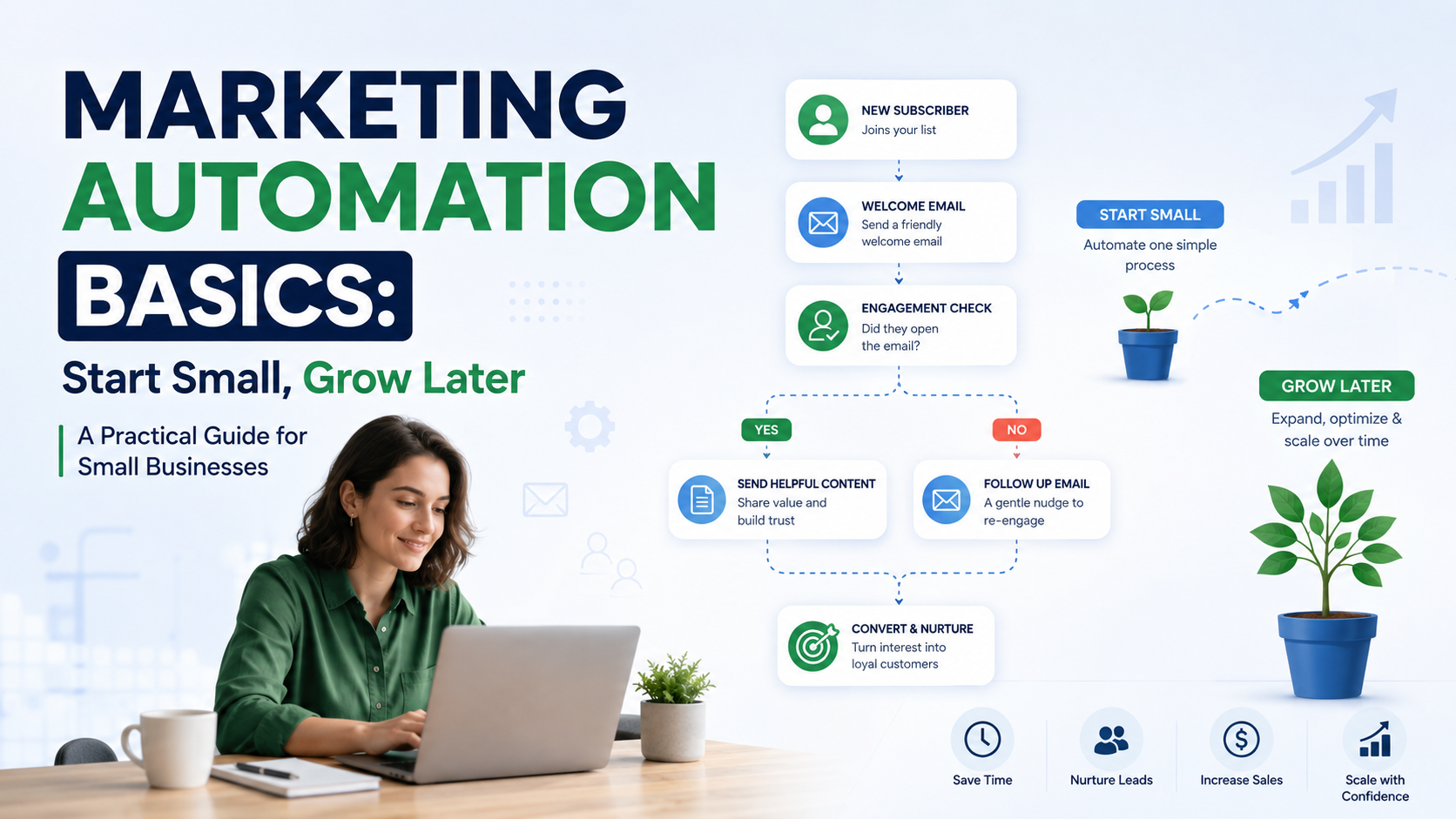
A simple automated welcome email.
A reminder for an abandoned cart.
A follow-up message after a customer inquiry.
These small improvements can create a better customer experience without adding more work.
The biggest mistake I have seen businesses make is trying to automate everything at once.
They buy expensive tools, create complicated workflows, and then stop using them because the system becomes too difficult.
A better approach is:
Start small.
Solve one problem.
Learn what works.
Then expand.
What Is Marketing Automation?
Marketing automation means using software to automatically complete marketing tasks based on specific actions or conditions.
Instead of manually doing every step, businesses create workflows that run automatically.
For example:
A visitor downloads a free guide from your website.
↓
Their email is added to your marketing list.
↓
They receive a welcome email.
↓
A few days later, they receive helpful information.
↓
Eventually, they receive an offer or consultation invitation.
The business stays connected without manually sending every message.
Why Small Businesses Should Consider Marketing Automation
Small businesses usually have limited time and resources.
The owner may handle:
- Marketing
- Sales
- Customer support
- Operations
- Administration
Automation helps reduce repetitive work.
It Saves Time
Imagine receiving 50 inquiries every month.
Without automation, someone needs to:
- Reply to each person
- Record information
- Schedule follow-ups
- Remember who needs attention
Automation can handle the first steps instantly.
It Improves Follow-Up
One of the biggest problems in business is not getting leads.
It is forgetting to follow up.
A potential customer may be interested today but not ready to buy immediately.
A simple email sequence keeps your business in their mind.
It Creates Better Customer Experiences
Customers expect quick responses.
A confirmation email after a purchase or inquiry makes a business feel organized and professional.
Common Marketing Automation Tasks Businesses Can Start With
You do not need a complex system.
Start with simple workflows.
1. Automated Welcome Emails
This is one of the easiest places to begin.
When someone joins your email list, they receive an automatic welcome message.
Example:
Customer subscribes.
↓
Receives welcome email.
↓
Gets helpful resources.
↓
Receives future updates.
Tools You Can Use:
Mailchimp
Brevo
ConvertKit
Why It Works
A new subscriber is already interested.
The timing is perfect.
You do not need to manually send the first message every time.
2. Lead Follow-Up Automation
This is one of the most valuable automations for service businesses.
A customer fills out a contact form.
Instead of waiting hours for someone to reply:
They immediately receive confirmation.
The sales team gets notified.
A follow-up task is created.
Example:
A landscaping company receives a quote request.
Automation:
New form submission
↓
Add lead to CRM
↓
Send confirmation email
↓
Notify sales person
Tools:
HubSpot
Pipedrive
Zapier
3. Abandoned Cart Emails
For ecommerce businesses, abandoned carts are common.
Someone adds products.
They leave.
Automation can remind them.
Example:
Customer adds product.
↓
No purchase after 24 hours.
↓
Email reminder is sent.
Tools:
Shopify
Klaviyo
4. Customer Review Requests
Reviews are extremely important for local businesses.
After completing a service, businesses can automatically request feedback.
Example:
Appointment completed.
↓
Customer receives review request.
Useful for:
- Restaurants
- Salons
- Contractors
- Healthcare businesses
5. Social Media Content Workflows
Many businesses struggle with consistency.
Automation can help organize content publishing.
Example:
Blog published.
↓
Social media post created.
↓
Team receives notification.
Tools:
- Buffer
- Zapier
- Canva
My Biggest Marketing Automation Mistake
When I first started setting up automation workflows, I made a mistake many beginners make.
I tried to create a perfect system from day one.
I connected everything:
CRM.
Email platform.
Forms.
Notifications.
Reporting.
The problem?
It became difficult to manage.
A small change in one place affected multiple workflows.
The lesson was simple:
Automation should reduce complexity, not create more.
Now I recommend starting with one clear goal.
For example:
“Every new lead should receive a response within five minutes.”
Solve that first.
Then improve.
How to Start Marketing Automation Step by Step
Step 1: Find Repetitive Tasks
Look at your weekly activities.
Ask:
“What do we do repeatedly?”
Examples:
- Sending emails
- Updating customer lists
- Creating tasks
- Following up with leads
Step 2: Choose One Problem
Do not automate everything.
Pick the biggest time-waster.
Examples:
Bad goal:
“Automate all marketing.”
Good goal:
“Automatically follow up with website leads.”
Step 3: Select the Right Tool
Choose based on your business needs.
A freelancer may only need email automation.
A growing company may need a CRM.
An ecommerce store may need customer lifecycle automation.
Step 4: Create a Simple Workflow
Example:
Trigger:
New email subscriber
Action:
Send welcome email
Action:
Wait three days
Action:
Send helpful content
Keep it simple.
Step 5: Test Everything
Before launching:
Check emails.
Test forms.
Review notifications.
A small mistake can create a poor customer experience.
Marketing Automation Tools Worth Knowing
HubSpot
Best for businesses that want CRM and marketing together.
Useful for:
- Lead management
- Email campaigns
- Sales tracking
Mailchimp
Good starting point for small businesses.
Useful for:
- Email newsletters
- Basic automation
- Audience management
ActiveCampaign
ActiveCampaign is popular for businesses needing more advanced email workflows.
Useful for:
- Customer journeys
- Segmentation
- Automated campaigns
Zapier
Great for connecting different apps.
Example:
Website form
↓
CRM
↓
Email platform
↓
Slack notification
Make
Make is another automation option for businesses that want more control over workflows.
Common Marketing Automation Mistakes
1. Automating Before Understanding the Customer Journey
Before automation, understand:
How do customers find you?
What questions do they ask?
What happens before purchase?
Automation should support your process, not replace thinking.
2. Sending Too Many Emails
Automation does not mean sending more messages.
Quality matters more than quantity.
3. Making Messages Feel Robotic
Customers notice generic communication.
Personalize where possible.
Use:
- Customer names
- Relevant content
- Helpful information
4. Ignoring Data Quality
Automation depends on accurate information.
Bad customer data creates bad results.
Keep your lists clean.
5. Choosing Expensive Tools Too Early
Many businesses pay for advanced platforms before they need them.
Start with tools that solve your current problem.
Upgrade when your needs grow.
A Simple Marketing Automation Plan for a Small Business
If I was setting up automation for a small business today, I would start with:
Month One:
Create:
- Welcome email sequence
- Lead notification system
- Basic customer database
Month Two:
Add:
- Follow-up reminders
- Customer review requests
- Better segmentation
Month Three:
Improve:
- Sales automation
- Customer retention campaigns
- Reporting
Final Thoughts
Marketing automation is not about creating a business that runs without people.
It is about helping people spend less time on repetitive tasks.
The best automation systems are usually simple.
A customer receives a quick response.
A lead gets proper follow-up.
A business remembers important actions.
That is where automation creates real value.
Start with one small improvement.
Do not build a complicated machine before understanding what your business actually needs.
The businesses that get the most from automation are not always the ones using the most advanced tools.
They are the ones that solve real problems, one workflow at a time.