A few years ago, I spent nearly an hour trying to find the email address of one business owner.
The company website had a contact form.
LinkedIn showed the owner’s name but no email.
Facebook had an inactive page.
The website footer only listed a phone number.
I tried guessing the email address manually, searched Google, checked old directory listings, and eventually found the correct address buried inside a PDF brochure on the company’s website.
That experience taught me something useful: finding a business owner’s email address is rarely about having one magical tool.
It is usually a process.
Sometimes the email is sitting in plain sight.
Sometimes you can work it out from the company’s email pattern.
Sometimes an email finder gets it immediately.
And sometimes the smartest move is simply to contact the company through another channel instead of spending 40 minutes chasing one address.
If you are doing sales outreach, partnership research, recruiting, PR, or B2B prospecting, learning this process can save a lot of time.
Here is the workflow I actually use.
Start With the Company Website
This sounds obvious, but people often jump straight into email-finding tools before checking the business website properly.
I always start with the simplest places first.
Look at:
- Contact page
- About page
- Team page
- Footer
- Privacy policy
- Terms page
- Press page
- Media kit
- Careers page
- Blog author pages
A surprising number of websites publish direct addresses such as:
john@company.com
founder@company.com
hello@company.com
sales@company.com
info@company.com
Even if you do not find the owner’s exact address, you may find another employee’s email.
That can reveal the company’s email format.
For example, if you find:
sarah.jones@acme.com
and the owner is Michael Brown, you can reasonably test:
michael.brown@acme.com
That is much faster than guessing randomly.
Search the Website Properly
Sometimes the email exists on the site but is not linked clearly.
Google can help.
Try searches such as:
site:company.com “@company.com”
or:
site:company.com email
or:
site:company.com “contact”
or:
site:company.com “founder”
If the company has downloadable PDFs, presentations, catalogs, or brochures, those are worth checking too.
I have found plenty of direct business emails inside:
- PDF catalogs
- Press releases
- Company presentations
- Event documents
- Partnership decks
- Supplier documents
Business owners sometimes publish a direct email years ago and forget the document is still indexed.
That does not automatically mean you should spam them.
It simply means the address may already be publicly available for legitimate business contact.
Find the Owner’s Name First
Before you can find the email, you usually need to know who actually owns or runs the company.
For small businesses, this is often easy.
Check the About page.
Search:
Company Name owner
or:
Company Name founder
or:
Company Name CEO
LinkedIn is often one of the fastest places to confirm the person.
For local businesses, you can also check Google Business Profile information, local chamber listings, press coverage, or business directories.
Be careful with titles.
The person listed as CEO may not be the founder.
The founder may no longer be involved.
A marketing director may be a better contact than the owner depending on what you are selling.
If you are offering paid advertising services, for example, contacting a head of marketing may make more sense than emailing the founder of a 500-person company.
The goal is not just finding an email.
It is finding the right person.
LinkedIn Is Usually My Next Stop
Once I know the owner’s name, I check LinkedIn.
LinkedIn does not always show email addresses publicly, but it gives useful context.
You can confirm:
- Full name
- Current company
- Job title
- Company spelling
- Company domain
- Location
- Employment history
Sometimes contact information is available directly in the profile’s contact section.
Other times, you can use the name and company domain with an email-finding tool.
LinkedIn Sales Navigator is especially useful when you are doing this at scale because you can filter companies and decision-makers more precisely.
But for a small number of prospects, regular LinkedIn is often enough.
One important lesson: verify that the person still works there.
I have seen plenty of outreach campaigns where someone emailed a “founder” who had sold the company years earlier.
Use Hunter for Domain-Based Email Discovery
Hunter is one of the first tools I think of when I already know the company domain.
You enter something like:
company.com
and it may return public or indexed email addresses associated with the domain.
The useful part is not only finding the exact owner’s email.
Hunter may also show the company’s common email pattern.
For example:
first.last@company.com
first@company.com
firstinitiallastname@company.com
Once you know the pattern, finding another employee’s likely address becomes much easier.
If Hunter shows:
jane.smith@company.com
and you know the founder is Tom Wilson, then:
tom.wilson@company.com
becomes a reasonable candidate.
Do not assume a guessed email is automatically correct, though.
Verify it before using it for outreach.
Apollo Can Be Useful for B2B Contacts
Apollo is another tool commonly used for finding business contact information.
It is especially useful when you are building prospect lists based on things like:
- Job title
- Company size
- Industry
- Location
- Seniority
- Department
Instead of searching for one person manually, you can build a list such as:
“Owners of accounting firms in Texas with 5 to 50 employees.”
That can save a huge amount of time.
The downside is that no contact database is perfect.
People change jobs.
Companies change domains.
Old addresses remain in databases.
So I never treat any contact database as guaranteed truth.
Think of it as a starting point.
Verification comes next.
Try Clearbit, RocketReach, or Similar Tools
There are several other platforms that can help match a person with a professional email.
Examples include:
- RocketReach
- ContactOut
- Snov.io
- Lusha
- Kaspr
- Seamless.AI
Each tool has different data coverage.
One tool may find a contact that another misses.
This is why experienced prospectors usually do not depend on only one database.
That said, you do not need subscriptions to six tools if you only contact a few businesses every week.
Start simple.
Use free searches where available.
Upgrade only when the volume justifies it.
Guessing the Email Pattern Can Work Surprisingly Well
This is one of the oldest methods, and it still works.
Most business email addresses follow predictable patterns.
Common formats include:
firstname@company.com
firstname.lastname@company.com
firstinitiallastname@company.com
firstnameinitial.lastname@company.com
firstname_lastname@company.com
Suppose the business owner is:
Daniel Harper
and the domain is:
harperbuild.com
You might test:
daniel@harperbuild.com
daniel.harper@harperbuild.com
dharper@harperbuild.com
danielh@harperbuild.com
Do not start sending messages to every variation.
That can generate unnecessary bounces.
Use an email verification tool first.
Email Verification Is Not Optional
This is where beginners often make a mistake.
They find what looks like a valid address and immediately email it.
If you are doing that repeatedly, your bounce rate can become a problem.
Tools such as NeverBounce, ZeroBounce, Hunter Verify, BriteVerify, and similar services can check whether an email appears deliverable.
No verification service is perfect.
Some domains use catch-all mailboxes, meaning the server accepts messages even when the exact mailbox cannot be confirmed.
That is why you may see results such as:
Valid
Invalid
Accept all
Unknown
Risky
If the result is uncertain, be more cautious.
A healthy email list is better than a large list full of questionable addresses.
Google Search Is Still Underrated
When dedicated email tools fail, I go back to Google.
Search the full name in quotation marks.
For example:
“Daniel Harper” email
Then:
“Daniel Harper” “harperbuild.com”
Then:
“Daniel Harper” contact
Then:
“Daniel Harper” “@harperbuild.com”
You can also search the company name with the owner’s name.
Sometimes results appear from:
- Conference speaker pages
- Podcast appearances
- Business associations
- Press releases
- Guest articles
- Directory profiles
- Old company documents
This is especially useful for founders who appear publicly in their industry.
Check Press Releases and News Pages
Founders often provide direct contact details when dealing with journalists, events, or public announcements.
Look for pages titled:
Press
Media
Newsroom
Investor Relations
Media Contact
Press Contact
Even if the founder’s direct email is not there, you may find a communications address that can route you to the right person.
For some types of outreach, that may actually be more appropriate than contacting the owner directly.
Check Business Directories Carefully
Local business directories can help, especially for smaller companies.
Depending on the country and industry, useful sources may include:
- Chamber of commerce directories
- Professional associations
- Local business groups
- Trade organizations
- Supplier directories
- Franchise directories
Some directories list direct business contact details.
Others only list general company information.
Be cautious with random “people finder” websites.
Some contain outdated, scraped, or highly personal data that is not appropriate for normal business outreach.
For legitimate B2B prospecting, I stick to professional and publicly relevant sources.
Facebook and Instagram Can Help With Small Local Businesses
This is particularly useful for:
- Restaurants
- Contractors
- Salons
- Fitness studios
- Photographers
- Small ecommerce brands
- Local service providers
Many small business owners use social media more actively than their company website.
Check the About section of the Facebook page.
Look at the Instagram bio.
Some accounts list:
Email buttons
Business contact details
Website links
Direct booking links
If you still cannot find the owner’s email, sending a short direct message asking for the appropriate business email can be perfectly reasonable.
For example:
“Hi, I’m trying to reach the person who handles partnerships. What’s the best email to use?”
Sometimes asking is faster than investigating.
Check YouTube Channels and Podcast Pages
This one is surprisingly useful for founders who create content.
YouTube creators and business channels may include business contact information in their channel details or linked website.
Podcast guest pages can also contain bios and contact information.
Suppose a founder appeared on a business podcast six months ago.
Search:
“Founder Name” podcast
You may find a guest page with:
Company website
Twitter/X
Media contact
Again, use information appropriately.
A media email published for interviews may not be the best place to send a sales pitch.
Context matters.
Use WHOIS Carefully
Years ago, WHOIS records were a much easier way to find website owner information.
Today, privacy protection hides much of that data.
Still, domain registration information can occasionally help confirm company details.
I would not rely on WHOIS as a primary email-finding method.
And I would not try to bypass privacy protections.
If a domain owner has intentionally kept registration details private, respect that.
There are usually better business-focused ways to contact them.
Check the Company’s Email Pattern Through Employees
This is one of the most reliable tricks.
Suppose you cannot find the founder’s email, but you find three employees:
anna@company.com
james@company.com
robert@company.com
The pattern is obvious.
The founder is Michael.
You can reasonably test:
michael@company.com
Now suppose the addresses are:
anna.williams@company.com
james.miller@company.com
robert.smith@company.com
Then the pattern is likely:
firstname.lastname@company.com
This is much more reliable than blindly trying ten formats.
You can find employee addresses through:
- Company pages
- Press releases
- Hunter
- Conference websites
- Public PDFs
Once the pattern is clear, verify the owner’s likely address.
What If the Business Uses Gmail?
Small businesses often use addresses like:
companyname@gmail.com
rather than a custom domain.
These can be harder to predict.
Check:
- Website contact page
- Google Business Profile
- Local directory listings
- Old ads
- PDF brochures
If you cannot find a direct address, the public Gmail address may already be the best contact.
Do not assume every small business owner has a private corporate inbox.
Sometimes the general email is the inbox the owner actually reads.
Do Not Ignore Generic Emails
People often dismiss:
info@company.com
hello@company.com
contact@company.com
sales@company.com
because they want the founder’s personal inbox.
That can be a mistake.
At a small company, the founder may personally monitor those addresses.
Even at a larger company, general inboxes can route messages internally.
If you have tried reasonable methods and cannot find a direct address, use the official business contact.
A legitimate email sent to:
hello@company.com
is better than endlessly guessing private-looking addresses.
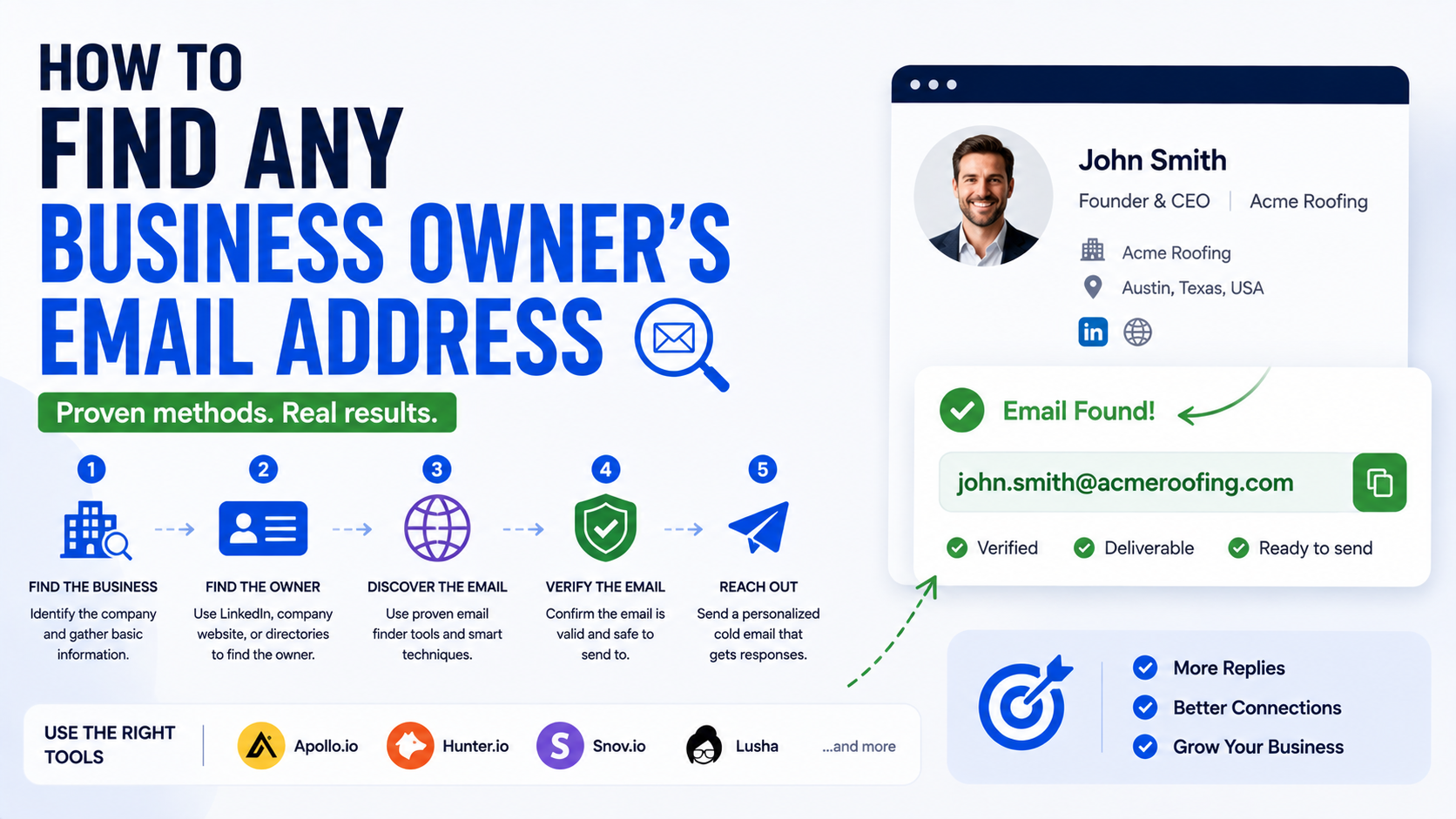
A Simple Workflow I Use
If I needed to find a business owner’s email right now, I would do it in this order.
Step 1: Find the Company Website
Confirm the correct domain.
Step 2: Find the Owner or Decision-Maker
Use the company website, LinkedIn, Google, or public business profiles.
Step 3: Search the Website
Check contact pages, team pages, PDFs, press pages, and footers.
Step 4: Search Google
Try the owner’s name plus the domain.
Step 5: Check LinkedIn
Confirm the person and role.
Step 6: Use a Domain Search Tool
Try Hunter, Apollo, RocketReach, or another professional contact platform.
Step 7: Identify the Email Pattern
Look at known employee addresses.
Step 8: Generate Likely Variations
Only if needed.
Step 9: Verify the Address
Use an email verification tool.
Step 10: Use the Appropriate Contact Method
If no reliable email exists, use the contact form, general inbox, LinkedIn, or business social account.
This workflow prevents me from spending too much time on one prospect.
How Long Should You Spend Finding One Email?
This depends on the value of the prospect.
If you are selling a $30,000 consulting engagement, spending ten minutes identifying the right decision-maker is reasonable.
If your average sale is $20, spending ten minutes per lead probably makes no sense.
This is where prospect tiers help.
For high-value targets, research manually.
For medium-value prospects, combine automation with verification.
For larger lists, use structured data tools and clear filtering rules.
Time spent on research should make economic sense.
Finding Emails at Scale
If you need 10 email addresses, manual research is fine.
If you need 5,000, you need a system.
A typical workflow may look like this:
Build the company list in Apollo, LinkedIn Sales Navigator, Google Maps, or another source.
Identify decision-makers.
Enrich contact data using tools such as Clay, Apollo, Hunter, or RocketReach.
Verify addresses.
Export only the clean contacts.
Import them into your CRM or outreach platform.
Track invalid addresses and remove them.
The key is not simply gathering as many emails as possible.
The key is collecting accurate contacts that actually match your target audience.
A small clean list is usually more useful than a huge messy one.
Keep a Good Spreadsheet
For smaller projects, Google Sheets works perfectly well.
I usually like columns such as:
Company
Website
Owner Name
Role
LinkedIn URL
Email Source
Verification Status
Location
Industry
Reason for Outreach
Contacted?
Response
Follow-Up Date
The “Email Source” column is useful.
You can write:
Website
Hunter
Apollo
Public PDF
Pattern + verification
This helps you understand where your best data is coming from.
Common Mistakes I Would Avoid
Guessing Without Verification
This creates unnecessary bounces.
Using Old Contact Data
People change roles constantly.
Verify employment before important outreach.
Buying Random Email Lists
Cheap lists are often outdated, poorly targeted, or collected in questionable ways.
A list of 50,000 addresses is useless if 45,000 are irrelevant.
Targeting the Owner Automatically
The owner is not always the right decision-maker.
Contact the person who actually owns the problem you solve.
Using Personal Emails When Business Contacts Exist
If someone has a professional business email, use that.
Do not dig for private personal addresses without a legitimate reason.
Spending Too Long on One Prospect
Set a time limit.
If the contact cannot be found, move on or use another channel.
Ignoring Privacy and Email Rules
Email discovery and email outreach are different issues.
Just because you can find an email does not mean every type of message is appropriate.
Commercial outreach may be subject to rules such as CAN-SPAM, GDPR, PECR, and other local laws depending on your location and your recipient.
Use accurate sender information.
Avoid deceptive subject lines.
Honor opt-out requests.
Understand the rules that apply to your campaign.
Do Not Turn Email Finding Into Stalking
This is worth saying clearly.
There is a difference between locating a professional business contact and digging into someone’s private life.
If you are trying to reach a business owner, focus on professional sources.
Company websites.
LinkedIn.
Business databases.
Public industry pages.
Business social profiles.
Trade directories.
Professional email formats.
You usually do not need private home addresses, family information, personal accounts, or other unrelated details.
That information does not make outreach better.
It just makes it intrusive.
What I Do When I Cannot Find the Email
Sometimes I stop looking.
That is an underrated skill.
If I have checked the website, Google, LinkedIn, and one or two contact tools and still cannot find a trustworthy address, I switch channels.
I might:
Send a LinkedIn connection request.
Use the website contact form.
Send a short message to the company’s social account.
Call the business.
Email the general inbox.
Ask the receptionist who handles the relevant area.
Something as simple as:
“Hi, who would be the best person to contact about your website?”
can solve the problem in 30 seconds.
You do not always need to discover the secret email address.
You just need a legitimate way to start the conversation.
The Best Email-Finding Process Is Usually the Simplest One
People sometimes make email prospecting far more complicated than it needs to be.
They build enormous automation workflows, connect five enrichment tools, generate every possible email combination, and end up with a spreadsheet full of contacts they barely understand.
I prefer a simpler rule.
First, identify the right business.
Then identify the right person.
Then look for the most obvious professional contact.
If it is not available, use the company’s email pattern.
Verify anything you had to infer.
And if you still cannot find a reliable address, use another legitimate contact channel.
That process may not sound clever, but it works.
The real skill is not finding millions of email addresses.
It is finding the right contact information for people who actually have a reason to hear from you.
Once you start thinking that way, email research becomes much faster, cleaner, and more useful.