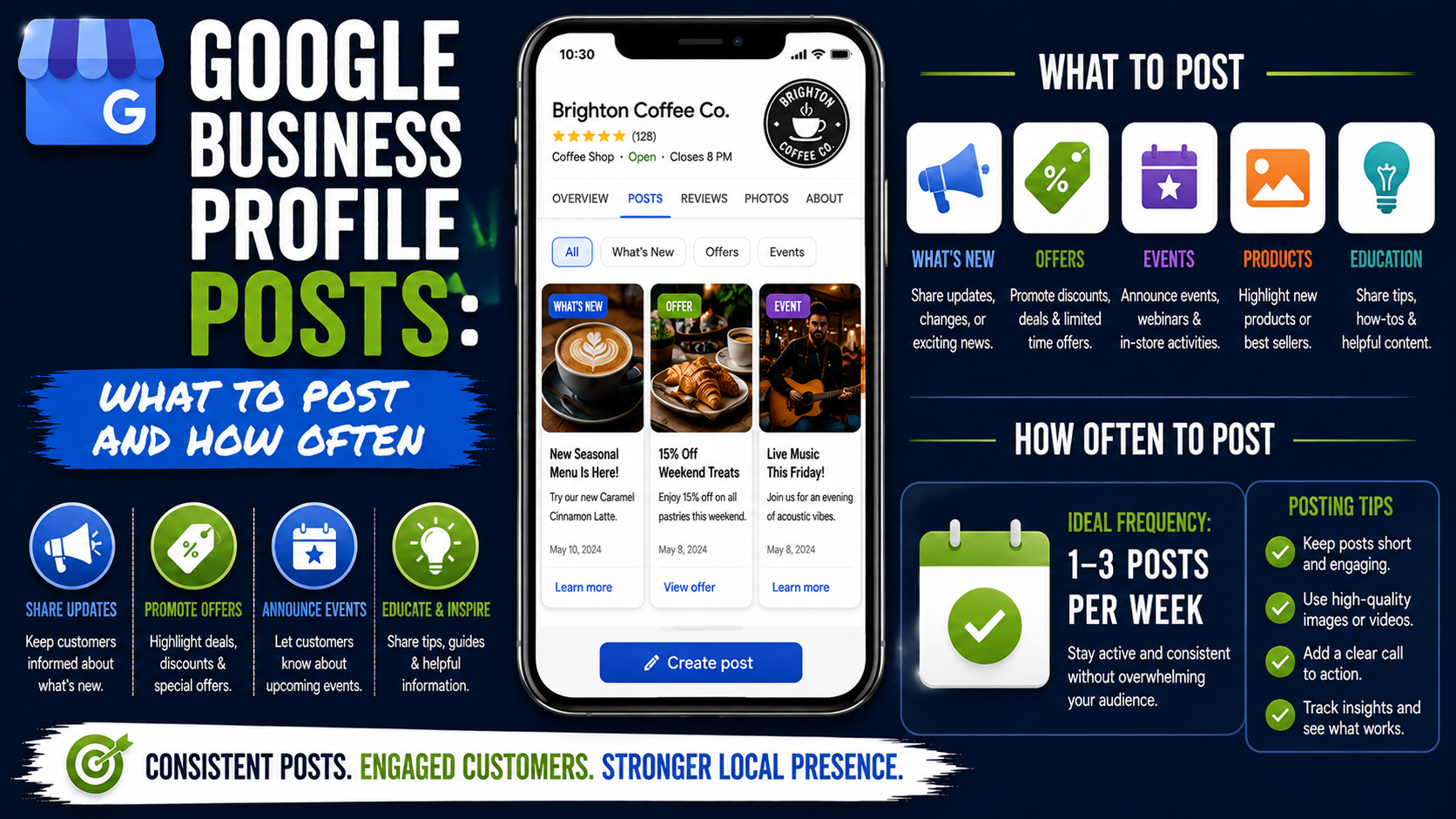
A business owner once asked me a question that sounds simple but comes up all the time:
“Do I really need to keep posting on my Google Business Profile?”
The confusion makes sense.
Most business owners already have enough to manage. There is the website, Facebook, Instagram, reviews, emails, ads, phone calls, and actual customers. Adding another place that needs content every few days can feel like unnecessary work.
The bigger problem is that many businesses have no idea what to post.
So they publish something like:
“Call us today for the best service!”
Then the following week:
“We provide quality service. Contact us now!”
After three nearly identical posts, they run out of ideas and stop updating the profile completely.
That is usually the wrong way to approach Google Business Profile Posts.
You do not need to treat your Google Business Profile like Instagram. You do not need clever captions every morning either.
What you need is useful, local, business-specific content that helps someone make a decision.
That difference matters.
What Are Google Business Profile Posts?
Google Business Profile Posts are updates that can appear directly on your business listing in Google Search and Google Maps.
Google currently allows businesses to create posts for updates, offers, and events. Posts can include text, photos, videos, links, and certain call-to-action buttons depending on the post type.
Think of them as small pieces of content sitting very close to the point where a potential customer is deciding whether to contact you.
Someone searching for:
“landscaper near me”
may already be comparing three or four companies.
If one profile shows recent landscaping projects, seasonal services, customer-friendly offers, and useful updates while another looks untouched, the active profile simply gives the customer more information to work with.
That is where Posts become useful.
Do Google Business Profile Posts Improve Rankings?
This is where local SEO advice often becomes exaggerated.
You will sometimes hear claims like:
“Post every day and you will rank number one on Google Maps.”
That is not something I would build a strategy around.
Google explains that local rankings are mainly determined by relevance, distance, and prominence. Complete business information, reviews, links, overall web presence, and other signals can contribute to local visibility.
Google does not say that publishing seven posts instead of two posts per week automatically moves a listing three positions higher.
That does not make Posts useless.
I look at them more as a supporting part of Google Business Profile optimization.
Good Posts can:
- Keep your profile looking current
- Show customers what you actually do
- Highlight important services
- Promote seasonal offers
- Send visitors to relevant website pages
- Show recent projects or products
- Give customers another reason to contact you
That is much more realistic than treating Posts as a secret ranking hack.
How Often Should You Post?
There is no universal posting frequency that Google requires.
For most local businesses, I like a simple schedule:
1 to 2 posts per week.
That is enough for many businesses to stay active without creating content just for the sake of creating content.
A business with more activity may comfortably publish three times a week.
For example, a restaurant might have:
- Monday lunch special
- Wednesday new menu item
- Friday weekend event
A landscaping company may only need:
- Tuesday completed project
- Friday seasonal service reminder
Both can work.
The key is relevance.
Publishing seven weak posts every week is not automatically better than publishing two genuinely useful ones.
Google also says posts older than six months can be archived unless a date range has been set, which is another reason not to publish once and forget about your profile forever.
What Should You Post on Google Business Profile?
This is where most businesses get stuck.
You actually have far more content available than you probably realize.
Here are some of the formats I would prioritize.
1. Recent Work and Completed Projects
This is one of the easiest post ideas for service businesses.
Imagine you own a paving company.
Instead of posting:
“We offer professional driveway installation.”
Post something specific:
“Completed a new interlocking driveway installation this week in Oakville. The existing driveway was removed, the base was regraded, and new charcoal pavers were installed.”
Add a real project photo.
That gives the visitor evidence.
The same concept works for:
- Roofers
- Landscapers
- Painters
- Contractors
- Interior designers
- Plumbers
- Electricians
- Cleaning companies
- Auto detailers
- HVAC companies
A recent-work post combines service relevance with visual proof.
You do not need to turn it into a case study.
A photo, two or three useful sentences, and an appropriate call to action are enough.
2. Individual Service Posts
One mistake I often see on local profiles is businesses trying to mention every service in one post.
It becomes something like:
“We offer landscaping, lawn care, grading, drainage, patios, retaining walls, interlocking, sod, concrete, decks, fences and more.”
That is not very helpful.
Give individual services their own posts instead.
One week:
Yard Drainage Installation
Explain when someone might need it.
The following week:
Interlocking Repair
Explain common issues such as sinking or uneven pavers.
Then:
Sod Replacement
Show a before-and-after photo.
This approach makes your content easier to understand and gives you months of post ideas without repeating yourself.
3. Before-and-After Posts
Before-and-after content works because customers can understand it immediately.
A homeowner does not need a technical explanation of surface restoration if the first image shows damaged paving and the second shows the completed result.
Use this format whenever the transformation is visible.
Good examples include:
- Landscaping
- Pressure washing
- Painting
- Remodeling
- Flooring
- Dental cosmetic work, where appropriate and compliant
- Auto detailing
- Cleaning
- Roofing
- Concrete repair
- Interior design
Keep the caption focused on what changed.
Do not bury the result underneath a giant sales paragraph.
4. Offers and Promotions
Google has a dedicated Offer post type.
Offers can include a title, start and end dates, descriptions, coupon codes, links, terms, images, and other relevant information.
This makes them useful when there is a genuine promotion.
For example:
Spring Lawn Cleanup – 15% Off Until April 30
or:
Free Consultation for Bathroom Remodeling Projects This Month
Just avoid inventing discounts every week because you think Google wants promotional content.
Constant sales can make a business look cheap rather than active.
Use offers when there is actually something worth promoting.
5. Seasonal Services
Seasonality is probably one of the easiest ways to plan GBP content.
If you are a roofer, winter and storm-related inspections become relevant.
If you are a landscaper:
Spring:
- Sod installation
- Garden cleanup
- Grading
Summer:
- Patio installation
- Landscape design
- Irrigation
Fall:
- Yard cleanup
- Drainage preparation
Winter:
- Snow services, where applicable
- Planning spring projects
This gives your posts natural timing.
Someone searching for drainage help after several days of heavy rain is much more likely to care about a drainage post than a generic company announcement.
6. Frequently Asked Questions
Look at the questions customers repeatedly ask before buying.
Those questions are already content ideas.
A paving contractor might hear:
“How long does an interlocking driveway last?”
A plumber might hear:
“Why does my water pressure keep dropping?”
A dentist might hear:
“How long does teeth whitening last?”
A lawyer might hear:
“What should I bring to my first consultation?”
Turn those into short educational posts.
You do not need a 1,500-word explanation.
Answer the question clearly and link to a deeper page on your website when appropriate.
7. New Products or Services
Launching something new?
Post about it.
For example:
“Deck restoration is now available for homeowners throughout our Mississauga service area.”
Explain what the service includes and who it is suitable for.
Retail businesses can do the same with new inventory, collections, menu items, or product arrivals.
Google specifically positions Business Profile Posts as a way to share new products, announcements, offers, events, and other current business information.
8. Events
The Event post type is useful when something has a real date attached to it.
Examples include:
- Open houses
- Workshops
- Restaurant events
- Grand openings
- Community events
- Free consultation days
- In-store demonstrations
- Classes
Google allows event posts to include a title, start date, end date, times, description, media, and call-to-action options.
Use the actual Event format instead of writing a normal Update when the date is important.
9. Company Updates That Customers Actually Care About
Not every company announcement deserves a GBP post.
“Happy Monday from the team!”
probably does not help someone choose your company.
A better company update would be:
“We have extended our Saturday opening hours for August.”
or:
“Our showroom has moved to a new location.”
or:
“We are now booking fall landscaping projects.”
Those updates affect the customer.
That is the filter I use:
Would this information be useful to someone considering the business?
If yes, it probably has potential.
10. Customer Results and Testimonials
You can also use a short customer success story.
Instead of copying a 300-word review, turn the experience into a short story:
“A homeowner contacted us after water continued collecting near the foundation every time it rained. We regraded the side yard and installed a drainage system to redirect the water.”
Then show the completed work.
This is often stronger than simply saying:
“We have happy customers.”
A Simple Weekly Posting Schedule
You do not need an elaborate content calendar.
Try this:
Week 1
Tuesday: Recent project
Friday: Service spotlight
Week 2
Tuesday: Customer question
Friday: Before and after
Week 3
Tuesday: Seasonal service
Friday: Recent project
Week 4
Tuesday: Educational tip
Friday: Offer, event, or service reminder
That gives you eight posts per month without constantly inventing new topics.
Even one solid weekly post gives you 52 opportunities a year to show customers what your business does.
How I Would Create a Post Step by Step
Here is the simple process I recommend.
Step 1: Choose One Topic
Do not try to cover the entire company.
Pick one service, project, offer, question, or update.
Step 2: Use a Real Photo When Possible
Real business photos are usually more believable than generic stock images.
For a contractor, show the actual work.
For a restaurant, show the actual food.
For a salon, show the space or finished work when appropriate.
Google itself recommends business-specific photos because they help customers understand what a business offers.
Step 3: Write for the Customer
Start with the useful information.
Instead of:
“ABC Landscaping is your trusted provider of high-quality landscaping solutions.”
Try:
“Uneven pavers around your patio are usually repairable without replacing the entire area.”
The second sentence gives the reader a reason to continue.
Step 4: Add Local Context Naturally
If the project happened in a real service area, mentioning the location can make the post more specific.
For example:
“Recently completed in Burlington.”
Do not write:
“Best landscaper Burlington landscaping Burlington landscaping company near me Burlington.”
That is keyword stuffing, not optimization.
Step 5: Add the Right Action
Depending on the post type, Google allows action buttons that can send customers to relevant pages or help them complete an action.
If you are discussing patio installation, link to the patio service page.
Do not automatically link every post to the homepage.
A relevant destination usually creates a better experience.
Common Google Business Profile Posting Mistakes
Posting the Same Thing Every Week
Changing two words in the same promotion does not create useful content.
Rotate between services, projects, FAQs, offers, and education.
Treating Every Post Like an Advertisement
People already know you want their business.
Give them something useful before asking them to call.
Using Generic Stock Photos
A perfectly staged stock photo of a contractor holding a clipboard does not prove that your company completed any work.
Use genuine project photos whenever you have them.
Writing Huge Blocks of Text
Google Business Profile is not your blog.
Keep the important information near the beginning.
Short paragraphs work better.
Stuffing Keywords
You do not need to repeat your city and service five times.
Write naturally.
Google’s local ranking guidance emphasizes complete, detailed, accurate business information rather than spammy tricks.
Putting Phone Numbers Inside Post Copy
This is one of the more practical policy mistakes to know about.
Google warns that phone numbers included directly inside the post description may cause the post to be rejected. Its Posts policy recommends using the appropriate call button tied to the verified profile phone number instead.
Publishing Without Checking the Result
After posting, take a minute to look at the profile as a customer would.
Google reviews posts, and their status may appear as Live, Pending, or Not approved depending on whether the content passes review.
Check that:
- The image displays correctly
- The link works
- The text is not cut awkwardly
- The post has actually gone live
Can You Schedule Google Business Profile Posts?
Yes.
Google currently supports scheduling Posts for a future date. Its current interface also supports repeating certain posts on schedules such as weekly, monthly, or a custom schedule.
That makes consistency much easier.
I would still be careful with repeating posts automatically for months.
Scheduling is useful.
Publishing the exact same stale promotion every Friday for a year is not.
A better system is to prepare several posts together.
For example, spend 45 minutes once a month creating:
- Two project posts
- Two service posts
- Two FAQ posts
- One seasonal post
- One offer or update
Then schedule them.
You get consistency without having to remember every Tuesday morning.
Tools That Make GBP Posting Easier
You do not need expensive software for one location.
A simple setup can include:
Google Business Profile: Publishing and scheduling.
Google Drive: Store project photos and content ideas.
Google Sheets: Maintain a basic posting calendar.
Canva: Create clean graphics when a real project photo is not enough.
Google Analytics 4: Check traffic to landing pages when you use trackable links.
UTM parameters: Useful for distinguishing traffic coming from GBP Posts from other website visits.
If you manage dozens of locations, dedicated local SEO platforms may save time, but a small business does not need a complicated technology stack just to publish useful updates.
What I Would Focus on Before Posting Every Day
This part matters.
If your profile has the wrong phone number, weak categories, incomplete services, almost no reviews, outdated photos, and incorrect opening hours, publishing daily Posts should not be your first priority.
Fix the foundation.
Google specifically recommends keeping Business Profile information complete and accurate, and its local ranking documentation highlights relevance, distance, and prominence as the primary local ranking concepts.
I would prioritize:
- Correct business information
- Proper primary and secondary categories
- Relevant services
- Good business description
- Real photos
- Consistent review generation
- Review responses
- Strong local landing pages
- Then ongoing Posts as part of regular profile activity
Posts work best as one part of a properly managed profile.
Final Thoughts
Google Business Profile Posts do not need to become another exhausting social media channel.
That is probably the biggest lesson.
You do not need to wake up wondering what inspirational quote your plumbing company should publish today.
Show the work.
Explain the services.
Answer customer questions.
Share genuine offers.
Mention useful company updates.
Publish seasonal information when customers are actually looking for it.
For most local businesses, one or two strong posts each week is a practical starting point. If you have enough meaningful content to post more often, do it. If not, do not create filler just to satisfy an imaginary posting quota.
A potential customer viewing your profile should come away thinking:
“These people are active, they clearly provide the service I need, and I can see evidence of their work.”
If your Posts help create that feeling, they are doing their job.